

Contents
- Modern Homepage
- Team Site Homepage
- Modern Site Contents & Recycle Bin
- Document Library, Classic
- Document Library, Modern
- Modern List
- OneDrive SPO Modern
- OneDrive 2016
- 2019 Team Site Modern
- 2019 Modern List
- 2019 Document Library, Modern
- O365 Calendar
- O365 Teams
- O365 Outlook
Modern Homepage
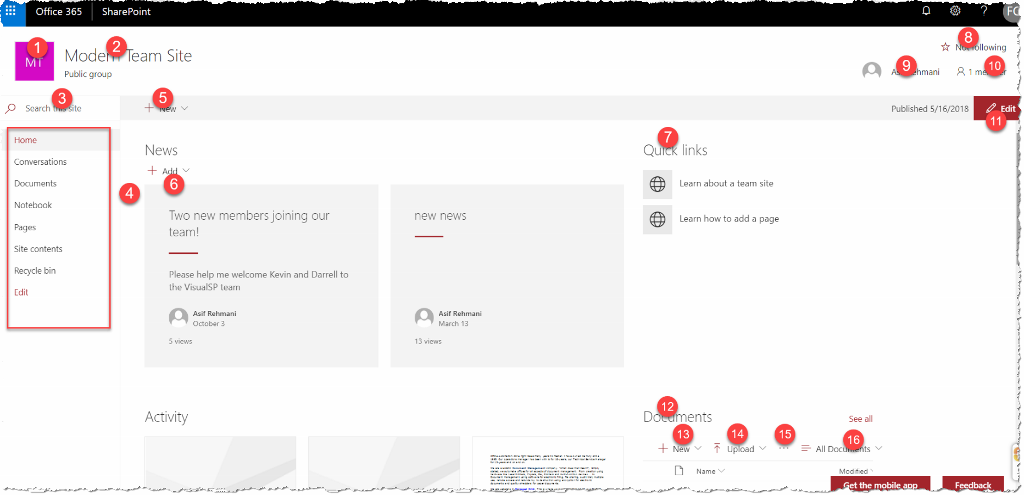
 1) .ms-siteLogo-defaultLogo
2) .ms-siteHeader-siteName
3) .ms-searchux-searchbox
4) .ms-Nav
5) .ms-CommandBarItem-link
6) .CanvasSection button:contains("Add")
7) span:contains("Quick links")
8) .ms-compositeHeader-addnCommands
9) .ms-TooltipHost
10) .ms-membersInfo-membersNumber
11) button[data-automation-id="pageCommandBarEditButton"]
12) .CanvasSection span:contains("Documents")
13) .CanvasSection button[name="New"]
14) .CanvasSection button[name="Upload"]
15) .CanvasSection button i[data-icon-name="More"]
16) .CanvasSection button[name="All Documents"]
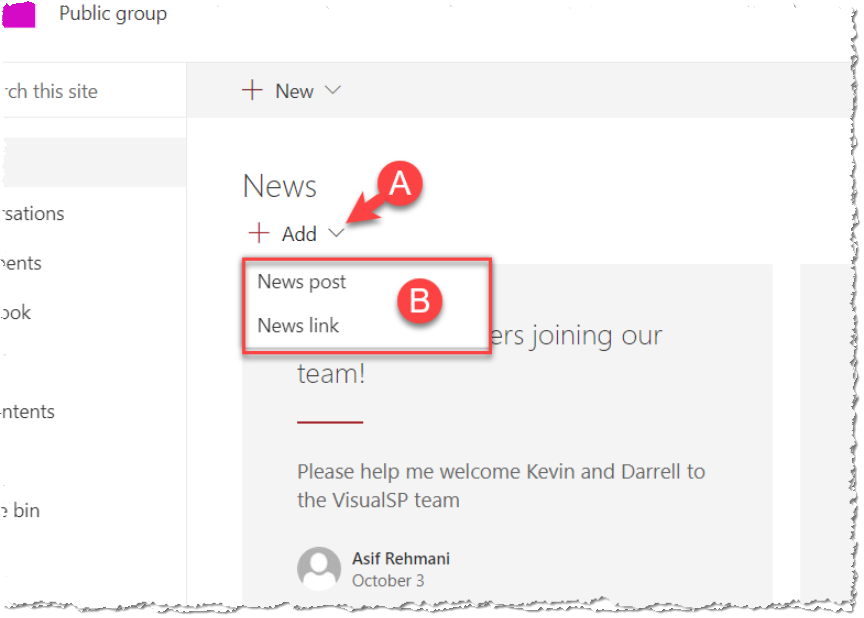
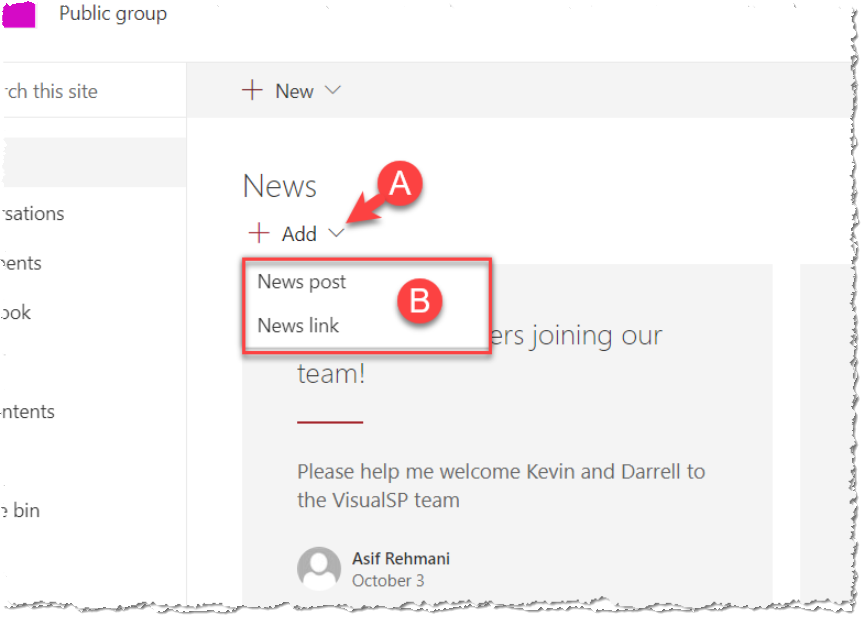
A) .ms-Button:contains("Add"):first i[data-icon-name="ChevronDown"]
B) button:contains('<name>'):first (ex: button:contains('News post'):first)
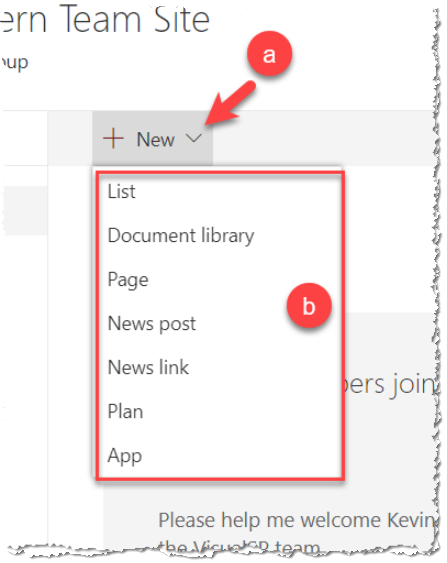
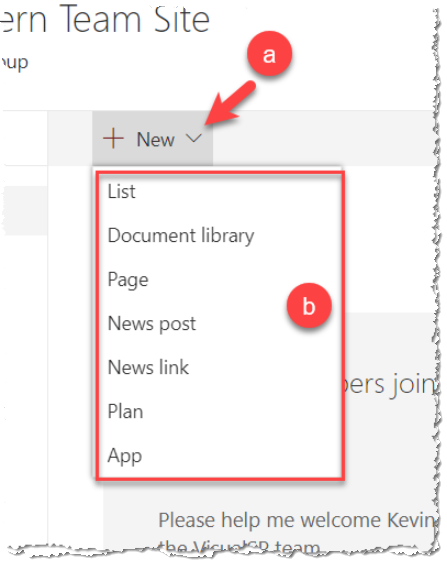
a) .ms-CommandBarItem-link i[data-icon-name="ChevronDown"]
b) button:contains('<name>'):first (ex: button:contains('List'):first)
1) .ms-siteLogo-defaultLogo
2) .ms-siteHeader-siteName
3) .ms-searchux-searchbox
4) .ms-Nav
5) .ms-CommandBarItem-link
6) .CanvasSection button:contains("Add")
7) span:contains("Quick links")
8) .ms-compositeHeader-addnCommands
9) .ms-TooltipHost
10) .ms-membersInfo-membersNumber
11) button[data-automation-id="pageCommandBarEditButton"]
12) .CanvasSection span:contains("Documents")
13) .CanvasSection button[name="New"]
14) .CanvasSection button[name="Upload"]
15) .CanvasSection button i[data-icon-name="More"]
16) .CanvasSection button[name="All Documents"]
A) .ms-Button:contains("Add"):first i[data-icon-name="ChevronDown"]
B) button:contains('<name>'):first (ex: button:contains('News post'):first)
a) .ms-CommandBarItem-link i[data-icon-name="ChevronDown"]
b) button:contains('<name>'):first (ex: button:contains('List'):first)
Team Site Homepage, Classic
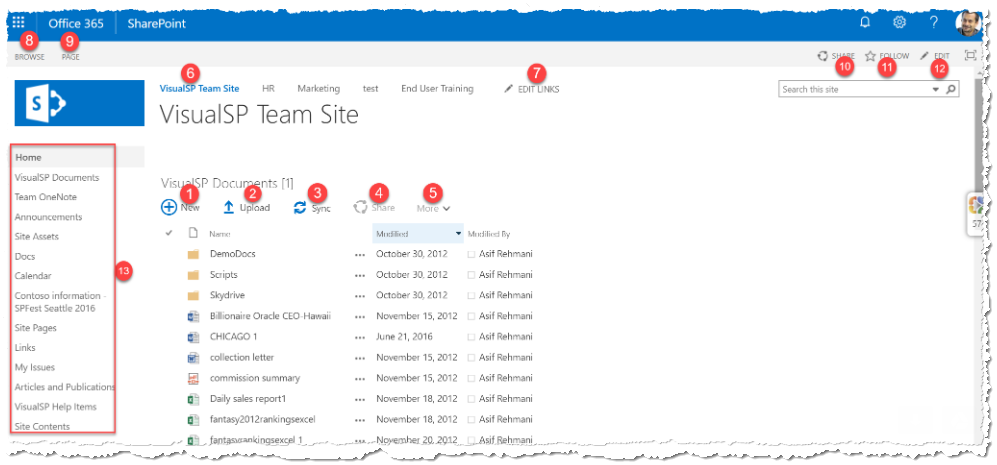 1) New Button - .js-listview-qcbNewButton:first OR button:contains('New'):first
2) Upload Button - .js-listview-qcbUploadButton:first OR button:contains('Upload'):first
3) Sync Button - .js-listview-qcbSyncButton:first OR button:contains('Sync'):first
4) Share Button - .js-listview-qcbShareButton:first OR button:contains('Share'):first
5) More Dopdown - .js-listview-qcbManageButton:first OR button:contains('More'):first
6) Team Site Title - .ms-core-listMenu-root > li:first
7) Edit Links - .ms-listMenu-editLink:first
8) Browse Tab - .ms-browseTab
9) Page Tab - .ms-cui-tt.ms-cui-tt-s
10) Share - Ribbon Right - .ms-cui-TabRowRight a:first
11) Follow - Ribbon Right - .ms-cui-TabRowRight a:nth-child(2)
12) Edit - Ribbon right - .ms-cui-TabRowRight a:nth-child(3)
13) Quick Start Menu - .ms-core-listMenu-verticalBox:first
1) New Button - .js-listview-qcbNewButton:first OR button:contains('New'):first
2) Upload Button - .js-listview-qcbUploadButton:first OR button:contains('Upload'):first
3) Sync Button - .js-listview-qcbSyncButton:first OR button:contains('Sync'):first
4) Share Button - .js-listview-qcbShareButton:first OR button:contains('Share'):first
5) More Dopdown - .js-listview-qcbManageButton:first OR button:contains('More'):first
6) Team Site Title - .ms-core-listMenu-root > li:first
7) Edit Links - .ms-listMenu-editLink:first
8) Browse Tab - .ms-browseTab
9) Page Tab - .ms-cui-tt.ms-cui-tt-s
10) Share - Ribbon Right - .ms-cui-TabRowRight a:first
11) Follow - Ribbon Right - .ms-cui-TabRowRight a:nth-child(2)
12) Edit - Ribbon right - .ms-cui-TabRowRight a:nth-child(3)
13) Quick Start Menu - .ms-core-listMenu-verticalBox:first
Modern Site Contents & Recycle Bin
 1) .ms-CommandBar-primaryCommand button:contains("New")
2) .od-Pivot .od-Pivot-itemText:contains("Contents")
3) .od-Pivot .od-Pivot-itemText:contains("Subsites")
4) .ms-CommandBar-secondaryCommand button:contains("Site usage")
5) .ms-CommandBar-secondaryCommand button:contains("Site workflows")
6) .ms-CommandBar-secondaryCommand button:contains("Site settings")
7) .ms-CommandBar-secondaryCommand button:contains("Recycle bin")
1) .ms-CommandBar-primaryCommand button:contains("New")
2) .od-Pivot .od-Pivot-itemText:contains("Contents")
3) .od-Pivot .od-Pivot-itemText:contains("Subsites")
4) .ms-CommandBar-secondaryCommand button:contains("Site usage")
5) .ms-CommandBar-secondaryCommand button:contains("Site workflows")
6) .ms-CommandBar-secondaryCommand button:contains("Site settings")
7) .ms-CommandBar-secondaryCommand button:contains("Recycle bin")
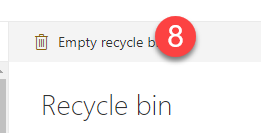
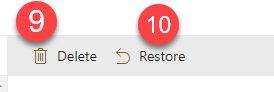 8) .ms-CommandBar-primaryCommand button:contains("Empty recycle bin")
9) .ms-CommandBar-primaryCommand button:contains("Delete") - Must have a checked item
10) .ms-CommandBar-primaryCommand button:contains("Restore") - Must have a checked item
8) .ms-CommandBar-primaryCommand button:contains("Empty recycle bin")
9) .ms-CommandBar-primaryCommand button:contains("Delete") - Must have a checked item
10) .ms-CommandBar-primaryCommand button:contains("Restore") - Must have a checked item
Document Library, Classic
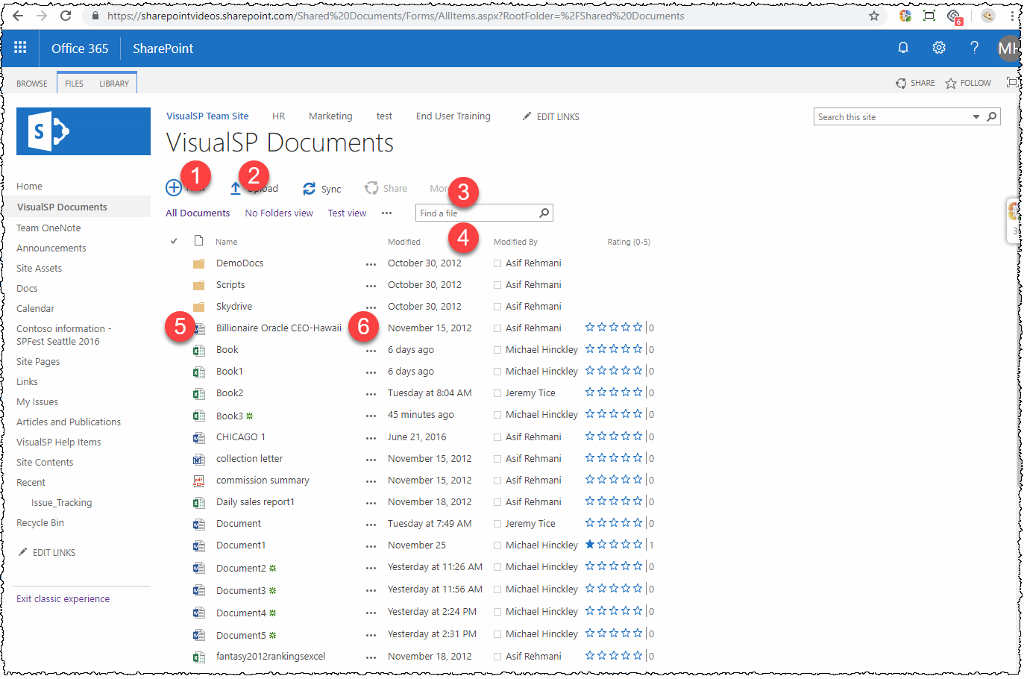
 |
 |
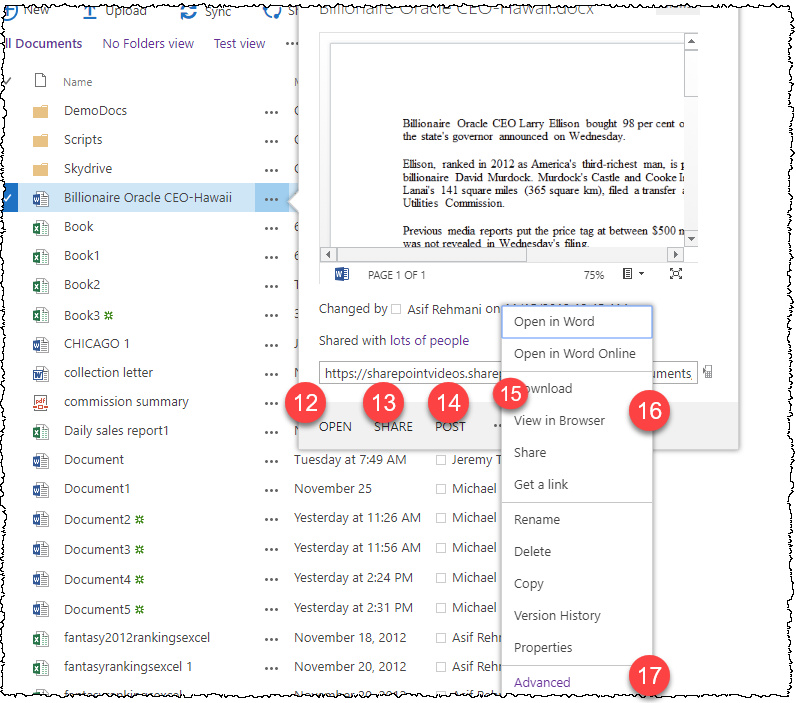
| 1 | Classic Doc Lib | New Button | .js-listview-qcbNewButton | |
| 2 | Classic Doc Lib | Upload Button | .js-listview-qcbUploadButton | |
| 3 | Classic Doc Lib | More Button | .js-listview-qcbManageButton | |
| 4 | Classic Doc Lib | Drop Down Arrow on Columns | th#msomenuid2 .s4-ctx | Has been fixed to remove checked dependency |
| 5 | Classic Doc Lib | Select File check | tr .s4-itm-imgCbx | Has been fixed to remove checked dependency |
| 6 | Classic Doc Lib | 3 dots | tr .ms-list-itemLink | |
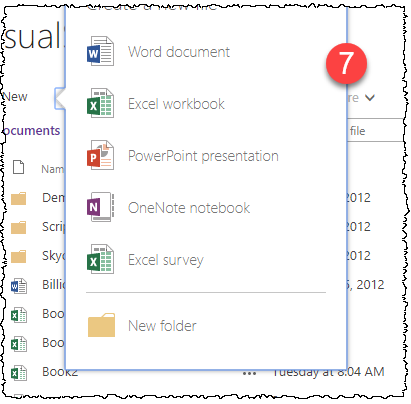
| 7 | Classic Doc Lib | Entire New Pop-up window | #cojs-newdocWOPI-WPQ1_callout | Must be visible to be targeted |
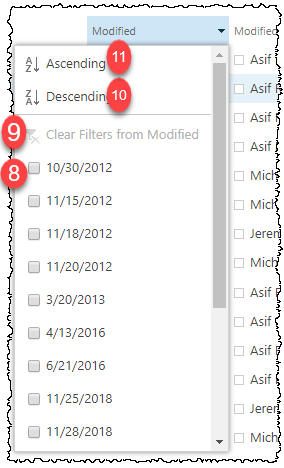
| 8 | Classic Doc Lib | Select Column Filter item | th#msomenuid2 .ms-core-menu-box .ms-core-menu-icon input[type="checkbox"] | Must be visible to be targeted |
| 9 | Classic Doc Lib | Clear Filters | th#msomenuid2 a.ms-core-menu-link[title="Clear Filters from Modified"] | Must be visible to be targeted |
| 10 | Classic Doc Lib | Ascending | th#msomenuid2 a.ms-core-menu-link[title="Ascending"] | Must be visible to be targeted |
| 11 | Classic Doc Lib | Descending | th#msomenuid2 a.ms-core-menu-link[title="Descending"] | Must be visible to be targeted |
| 12 | Classic Doc Lib | Open in pop-up | .js-callout-mainElement .js-callout-footerArea span.js-callout-actionsMain span.js-callout-action a:contains('Open') | Must be visible and differentiated from other matching elements to be targeted |
| 13 | Classic Doc Lib | Share in pop-up | .js-callout-mainElement .js-callout-footerArea span.js-callout-actionsMain span.js-callout-action a:contains('Share') | Must be visible and differentiated from other matching elements to be targeted |
| 14 | Classic Doc Lib | Post in pop-up | .js-callout-mainElement .js-callout-footerArea span.js-callout-actionsMain span.js-callout-action a:contains('Post') | Must be visible and differentiated from other matching elements to be targeted |
| 15 | Classic Doc Lib | 3 dots | .js-callout-mainElement .js-callout-footerArea span.js-callout-ecbActionDownArrow | Must be visible and differentiated from other matching elements to be targeted |
| 16 | Classic Doc Lib | Entire pop-up window | .ms-contextmenu-box.ms-js-contextmenu | Must be visible to be targeted |
| 17 | Classic Doc Lib | Advanced | .ms-contextmenu-box.ms-js-contextmenu #ID_AdvancedMenu | Must be visible to be targeted |
Document Library, Modern
 |
 |
 |
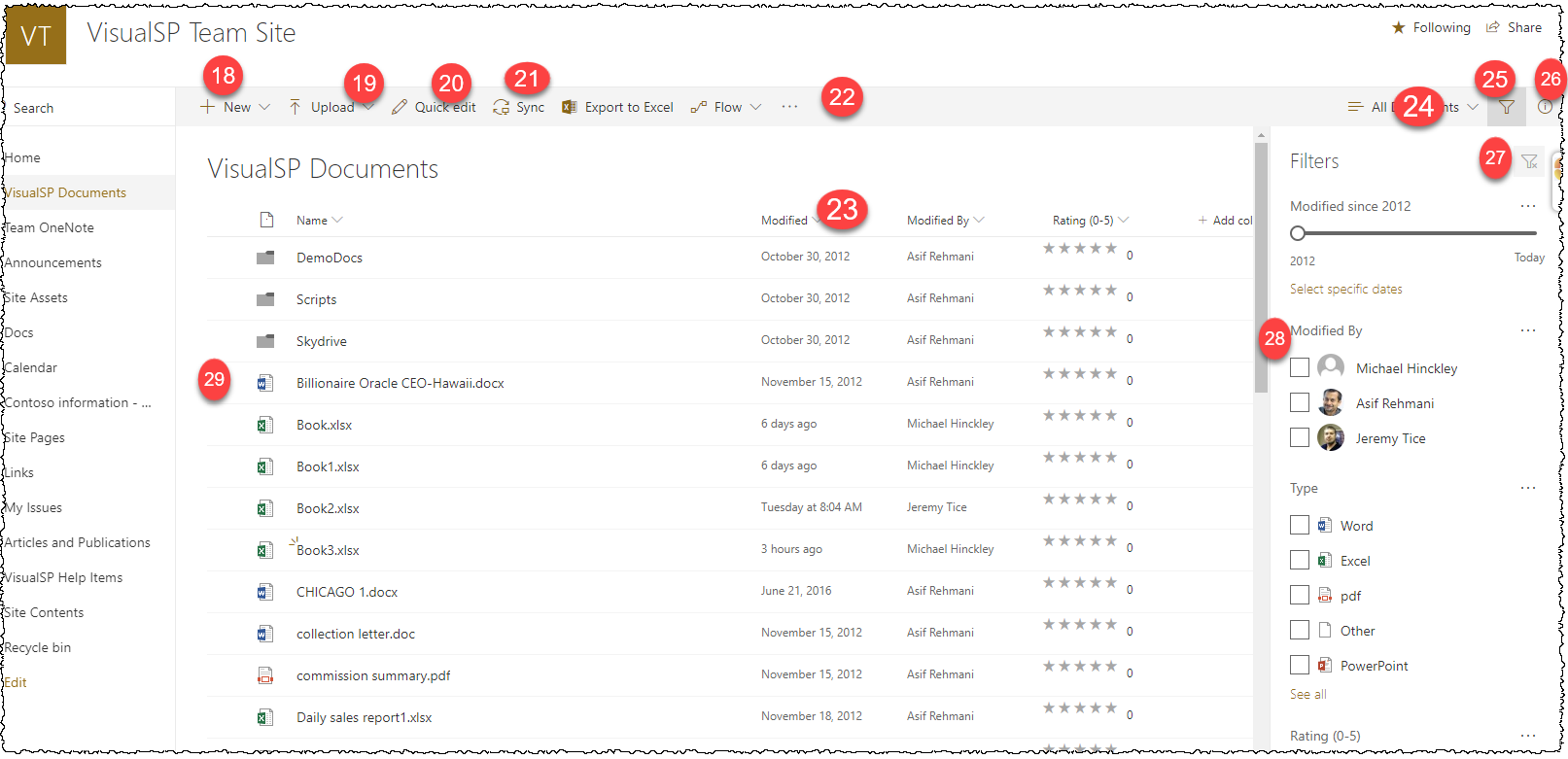
| 18 | Modern Doc Lib | New Button | div.ms-OverflowSet.ms-CommandBar-primaryCommand > div:nth-child(1) > button | |
| 19 | Modern Doc Lib | Upload Button | div.ms-OverflowSet.ms-CommandBar-primaryCommand > div:nth-child(2) > button | |
| 20 | Modern Doc Lib | Quick Edit | div.ms-OverflowSet.ms-CommandBar-primaryCommand > div:nth-child(3) > button | |
| 21 | Modern Doc Lib | Share and Upload to excel | div.ms-OverflowSet.ms-CommandBar-primaryCommand > div:nth-child(5) > button | |
| 22 | Modern Doc Lib | 3 dots | div.ms-OverflowSet.ms-CommandBar-primaryCommand > div:nth-child(8) > button | |
| 23 | Modern Doc Lib | Drop Down Arrow on Columns | #header0-dateModified > i | |
| 24 | Modern Doc Lib | View Choice | div.ms-OverflowSet.ms-CommandBar-secondaryCommand > div:nth-child(1) > button | |
| 25 | Modern Doc Lib | Filter | div.ms-OverflowSet.ms-CommandBar-secondaryCommand > div:nth-child(2) > button | |
| 26 | Modern Doc Lib | Info | div.ms-OverflowSet.ms-CommandBar-secondaryCommand > div:nth-child(3) > button | |
| 27 | Modern Doc Lib | Filter pop out | div.FiltersPane | |
| 28 | Modern Doc Lib | Select File check | .ms-Checkbox > label > div | |
| 29 | Modern Doc Lib | Click to open file | div.ms-DetailsList-contentWrapper > div > div > div > div > div:nth-child(1) > div:nth-child(4) > div > div | |
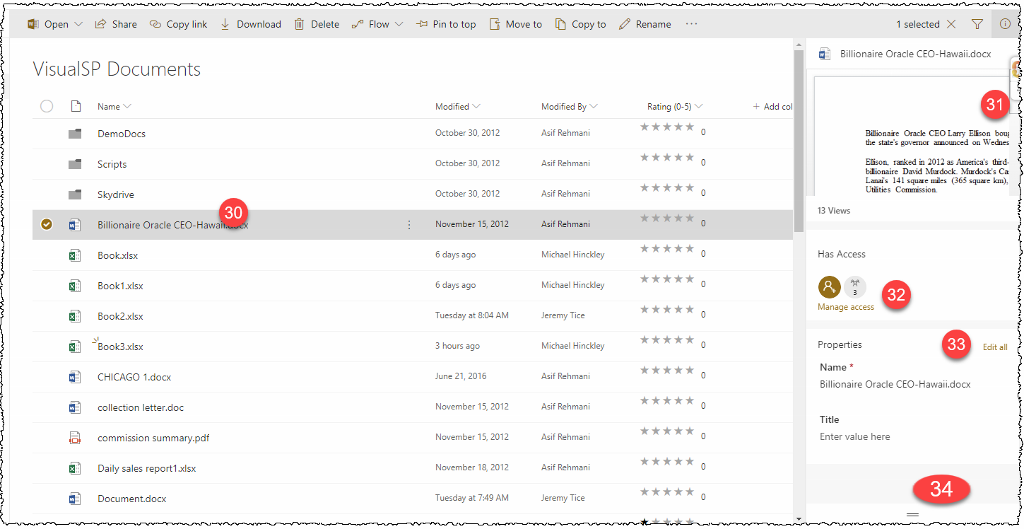
| 30 | Modern Doc Lib | div.ms-DetailsList-contentWrapper > div > div > div > div > div:nth-child(1) > div:nth-child(4) > div > div | ||
| 31 | Modern Doc Lib | Info pop up scroll | div.od-DetailsPane-ItemPreviewSection > div > div > div.InfoPaneSection--preview > div | |
| 32 | Modern Doc Lib | Manage access | div.od-DetailsPane-PrimaryPane-wrapper > div > div.od-DetailsPane-PrimaryPane-body > div > div > div:nth-child(2) > div > div | |
| 33 | Modern Doc Lib | Edit all | #spo-Properties-sectionHeader > a | |
| 34 | Modern Doc Lib | More Button | div.Files-rightPane > div.Files-rightPaneContent > div > div > div > div > div > div > div > div:nth-child(2) | |
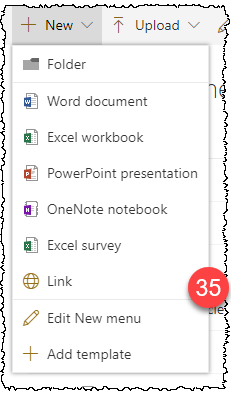
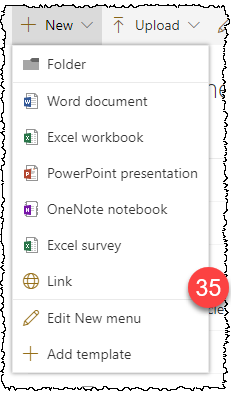
| 35 | Modern Doc Lib | New pop up window entire | ul.ms-ContextualMenu-list | Dynamically added to page. Must be visible by previous step |
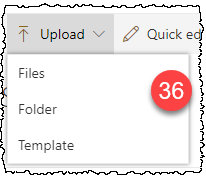
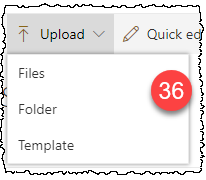
| 36 | Modern Doc Lib | Upload pop up window entire | ul.ms-ContextualMenu-list | Dynamically added to page. Must be visible by previous step |
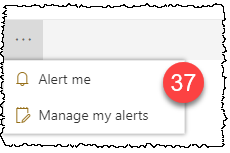
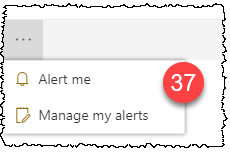
| 37 | Modern Doc Lib | 3 dots alert | ul.ms-ContextualMenu-list | Dynamically added to page. Must be visible by previous step |
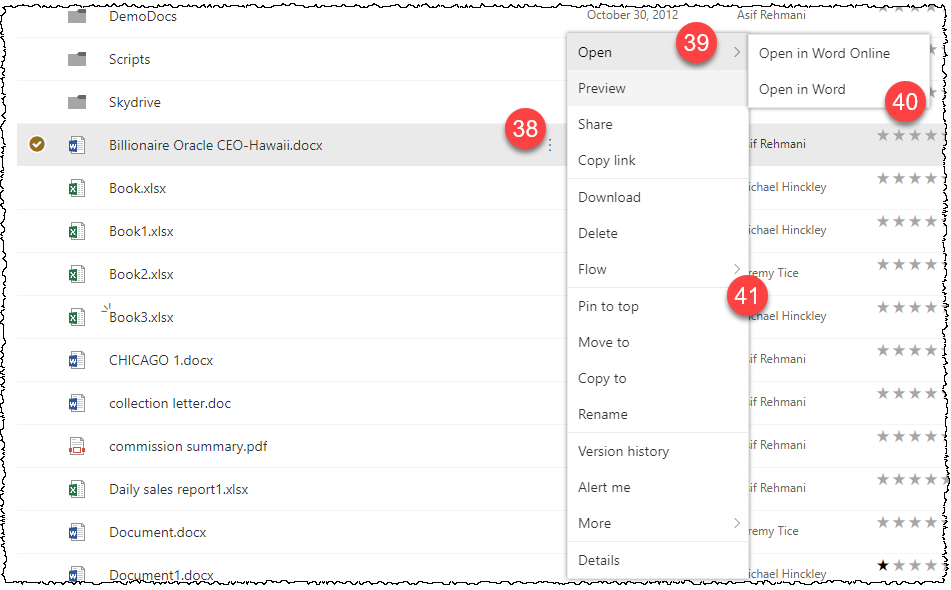
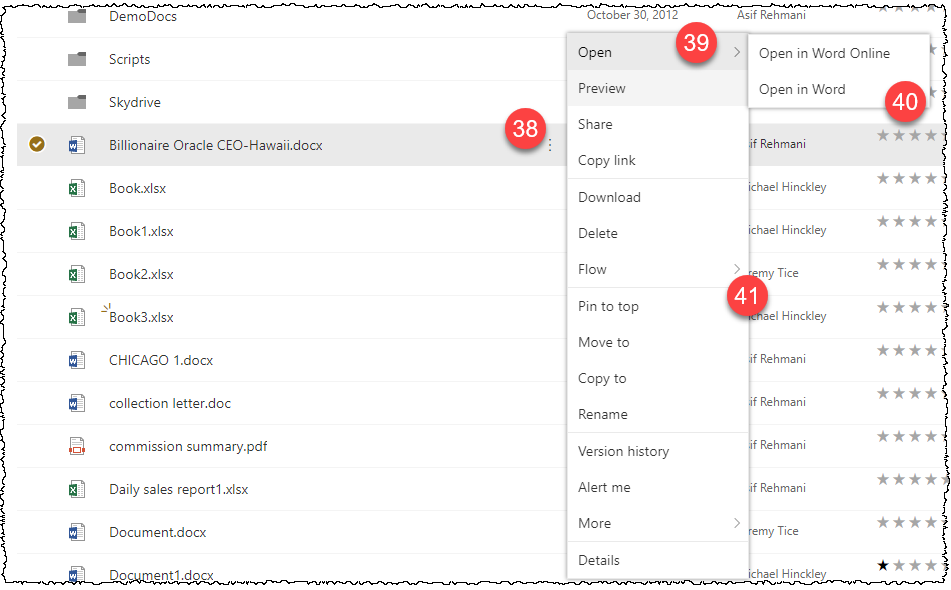
| 38 | Modern Doc Lib | on select file 3 dots | div.ms-DetailsRow.is-selected div.ms-DetailsRow-fields > div.od-DetailsRow-cell--Name > div > span > div:nth-child(2) > button | Dynamically added to page. Must be visible by previous step |
| 39 | Modern Doc Lib | Open in pop up | ul.ms-ContextualMenu-list | Dynamically added to page. Must be visible by previous step |
| 40 | Modern Doc Lib | word type | ul.ms-ContextualMenu-list | Dynamically added to page. Must be visible by previous step |
| 41 | Modern Doc Lib | entire window | ul.ms-ContextualMenu-list | Dynamically added to page. Must be visible by previous step |

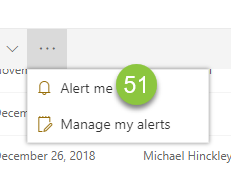
| 42 | Modern Doc Lib | Open Button | div.ms-OverflowSet.ms-CommandBar-primaryCommand > div:nth-child(1) > button | Library Item must be checked to activate |
| 43 | Modern Doc Lib | Share Button | div.ms-OverflowSet.ms-CommandBar-primaryCommand > div:nth-child(2) > button | Library Item must be checked to activate |
| 44 | Modern Doc Lib | Copy Link | div.ms-OverflowSet.ms-CommandBar-primaryCommand > div:nth-child(3) > button | Library Item must be checked to activate |
| 45 | Modern Doc Lib | Download | div.ms-OverflowSet.ms-CommandBar-primaryCommand > div:nth-child(4) > button | Library Item must be checked to activate |
| 46 | Modern Doc Lib | Delete | div.ms-OverflowSet.ms-CommandBar-primaryCommand > div:nth-child(5) > button | Library Item must be checked to activate |
| 47 | Modern Doc Lib | Pin To Top | div.ms-OverflowSet.ms-CommandBar-primaryCommand > div:nth-child(7) > button | Library Item must be checked to activate |
| 48 | Modern Doc Lib | Move To | div.ms-OverflowSet.ms-CommandBar-primaryCommand > div:nth-child(8) > button | Library Item must be checked to activate |
| 49 | Modern Doc Lib | Copy To | div.ms-OverflowSet.ms-CommandBar-primaryCommand > div:nth-child(9) > button | Library Item must be checked to activate |
| 50 | Modern Doc Lib | Reame | div.ms-OverflowSet.ms-CommandBar-primaryCommand > div:nth-child(10) > button | Library Item must be checked to activate |
| 51 | Modern Doc Lib | Alert Me click |
Modern List

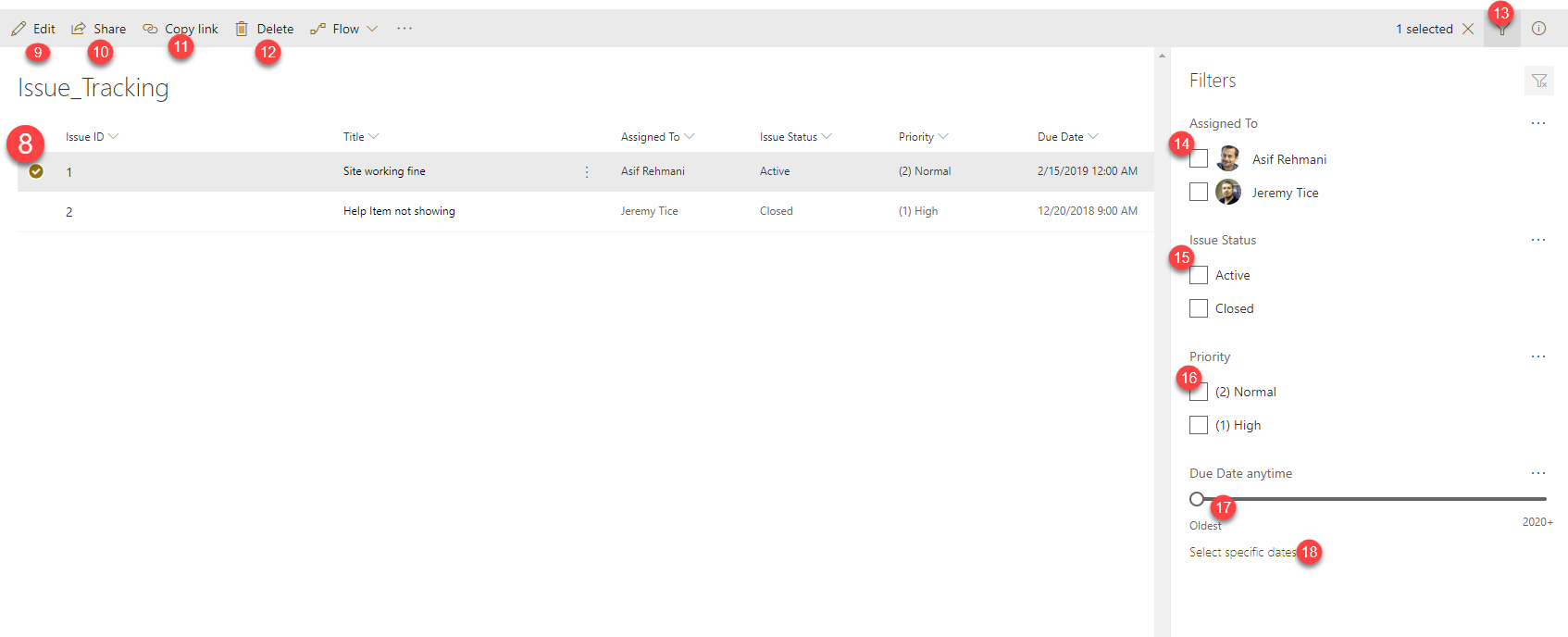
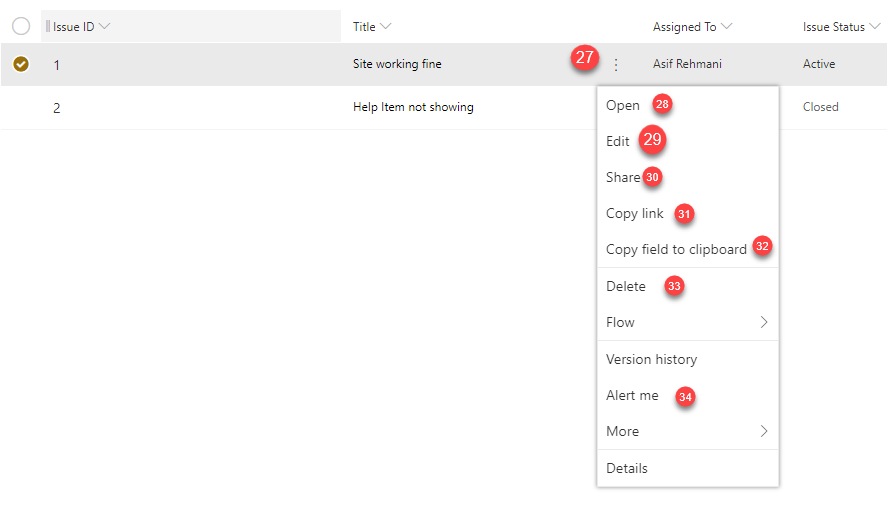
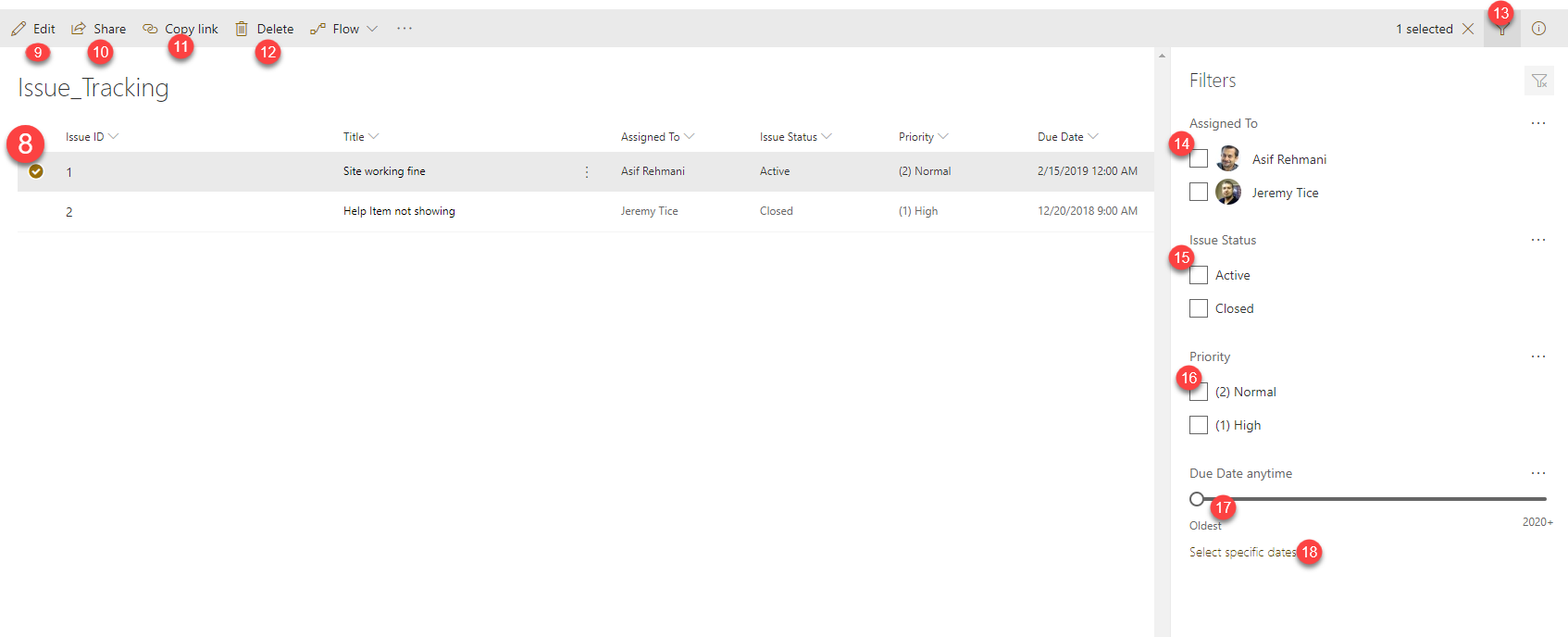
| 1 | div.ms-OverflowSet.ms-CommandBar-primaryCommand > div:nth-child(1) > button | ||
| 2 | div.ms-OverflowSet.ms-CommandBar-primaryCommand > div:nth-child(3) > button | ||
| 3 | div.ms-OverflowSet.ms-CommandBar-primaryCommand > div.ms-OverflowSet-overflowButton > button | ||
| 4 | div.ms-Callout.ms-ContextualMenu-Callout | Need to use Advance When target clicked from Step #3 | |
| 5 | div.ms-OverflowSet.ms-CommandBar-secondaryCommand > div:nth-child(1) > button | ||
| 6 | div.ms-OverflowSet.ms-CommandBar-secondaryCommand > div:nth-child(2) > button | ||
| 7 | div.ms-OverflowSet.ms-CommandBar-secondaryCommand > div:nth-child(3) > button | ||
| 8 | div.ms-Check.is-checked | ||
| 9 | div.ms-OverflowSet.ms-CommandBar-primaryCommand > div:nth-child(1) > button | ||
| 10 | div.ms-OverflowSet.ms-CommandBar-primaryCommand > div:nth-child(2) > button | ||
| 11 | div.ms-OverflowSet.ms-CommandBar-primaryCommand > div:nth-child(3) > button | ||
| 12 | div.ms-OverflowSet.ms-CommandBar-primaryCommand > div:nth-child(4) > button | ||
| 13 | div.ms-OverflowSet.ms-CommandBar-secondaryCommand > div:nth-child(2) > button | ||
| 14 | div.Files-rightPane > div.Files-rightPaneContent > div > div > div > div:nth-child(2) > .FiltersPane-sectionContent .ms-Checkbox > label > div | ||
| 15 | div.Files-rightPane > div.Files-rightPaneContent > div > div > div > div:nth-child(3) > .FiltersPane-sectionContent .ms-Checkbox > label > div | ||
| 16 | div.Files-rightPane > div.Files-rightPaneContent > div > div > div > div:nth-child(4) > .FiltersPane-sectionContent .ms-Checkbox > label > div | ||
| 17 | div.Files-rightPane > div.Files-rightPaneContent > div > div > div > div:nth-child(5) > .FiltersPane-slider | ||
| 18 | div.Files-rightPaneContent > div > div > div > div.FiltersPane-section.FiltersPane-sliderFilterSection > div.FiltersPane-section > div.FiltersPane-sectionFooter > a | ||
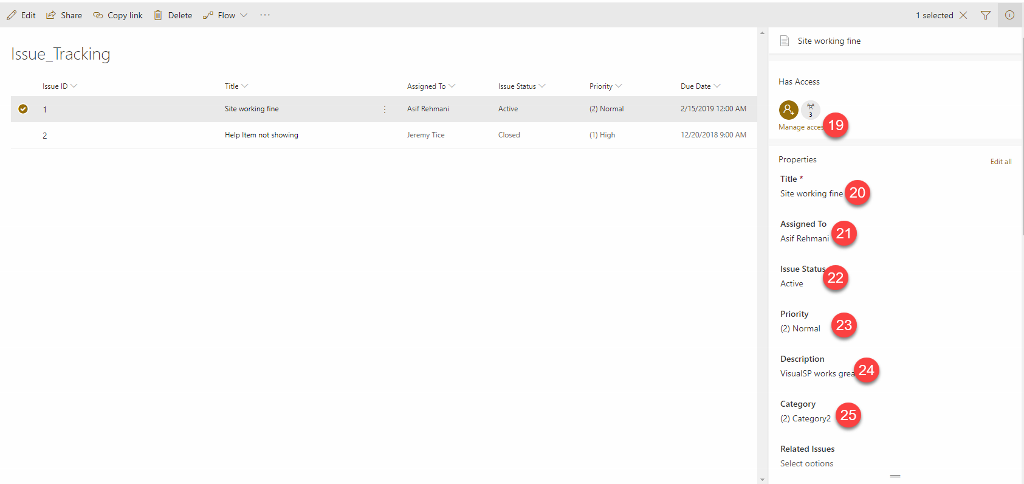
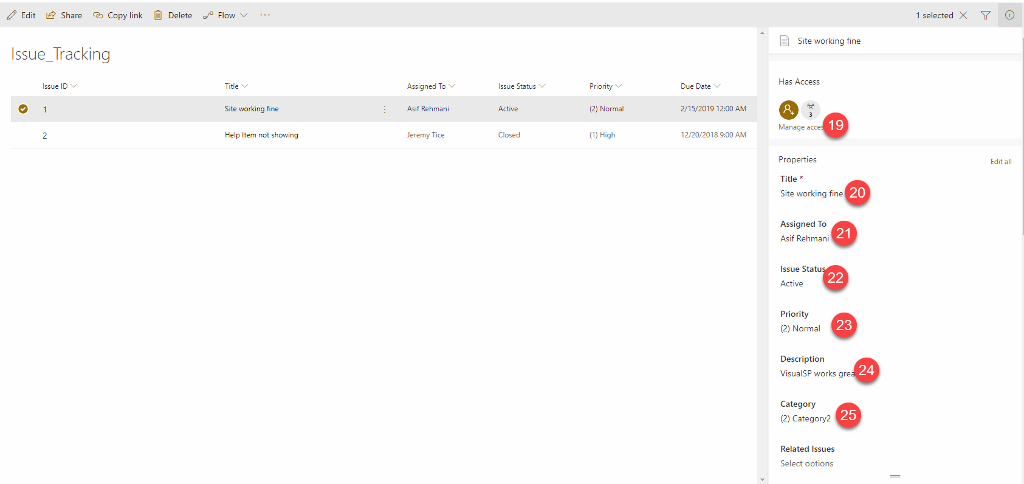
| 19 | div.ms-ScrollablePane--contentContainer > div.od-DetailsPane-PrimaryPane-wrapper > div > div.od-DetailsPane-PrimaryPane-body > div > div > div:nth-child(1) > div > div > div.ms-font-s > a | ||
| 20 | div.od-DetailsPane-PrimaryPane-wrapper > div > div.od-DetailsPane-PrimaryPane-body > div > div > div:nth-child(2) > div > div > div.InfoPane-sectionContent > div > div > div > div > div:nth-child(1) > div.ReactFieldEditor-core--display.is-infoPane > div > span | ||
| 21 | div.od-DetailsPane-PrimaryPane-wrapper > div > div.od-DetailsPane-PrimaryPane-body > div > div > div:nth-child(2) > div > div > div.InfoPane-sectionContent > div > div > div > div > div:nth-child(2) > div.ReactFieldEditor-core--display.is-infoPane > div > | ||
| 22 | div.od-DetailsPane-PrimaryPane-wrapper > div > div.od-DetailsPane-PrimaryPane-body > div > div > div:nth-child(2) > div > div > div.InfoPane-sectionContent > div > div > div > div > div:nth-child(3) > div.ReactFieldEditor-core--display.is-infoPane > div > | ||
| 23 | div.od-DetailsPane-PrimaryPane-wrapper > div > div.od-DetailsPane-PrimaryPane-body > div > div > div:nth-child(2) > div > div > div.InfoPane-sectionContent > div > div > div > div > div:nth-child(4) > div.ReactFieldEditor-core--display.is-infoPane > div > | ||
| 24 | div.od-DetailsPane-PrimaryPane-wrapper > div > div.od-DetailsPane-PrimaryPane-body > div > div > div:nth-child(2) > div > div > div.InfoPane-sectionContent > div > div > div > div > div:nth-child(5) > div.ReactFieldEditor-core--display.is-infoPane > div > | ||
| 25 | div.od-DetailsPane-PrimaryPane-wrapper > div > div.od-DetailsPane-PrimaryPane-body > div > div > div:nth-child(2) > div > div > div.InfoPane-sectionContent > div > div > div > div > div:nth-child(6) > div.ReactFieldEditor-core--display.is-infoPane > div > | ||
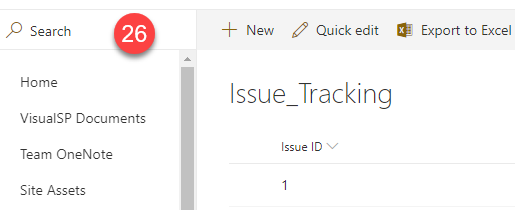
| 26 | #od-Search-div > div > span.od-SearchBox-search > input | ||
| 27 | div.ms-DetailsRow.is-selected > div.ms-DetailsRow-fields > div.od-DetailsRow-cell--Title.ms-DetailsRow-cell > div > span > div:nth-child(2) > button | ||
| 28 | .ms-ContextualMenu-list.is-open > li:nth-child(1) > button span.ms-ContextualMenu-itemText | ||
| 29 | .ms-ContextualMenu-list.is-open > li:nth-child(2) > button span.ms-ContextualMenu-itemText | ||
| 30 | .ms-ContextualMenu-list.is-open > li:nth-child(3) > button span.ms-ContextualMenu-itemText | ||
| 31 | .ms-ContextualMenu-list.is-open > li:nth-child(4) > button span.ms-ContextualMenu-itemText | ||
| 32 | .ms-ContextualMenu-list.is-open > li:nth-child(5) > button span.ms-ContextualMenu-itemText | ||
| 33 | .ms-ContextualMenu-list.is-open > li:nth-child(7) > button span.ms-ContextualMenu-itemText | ||
| 34 | .ms-ContextualMenu-list.is-open > li:nth-child(11) > button span.ms-ContextualMenu-itemText | ||
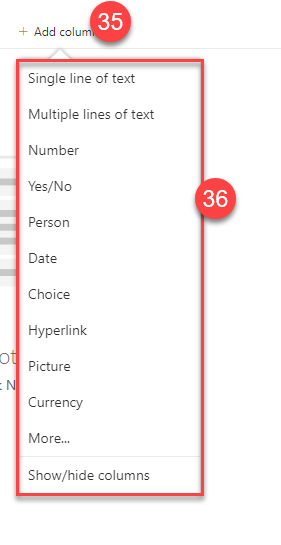
| 35 | CUSTOM LIST | .ms-DetailsHeader .ms-DetailsHeader-cellTitle:contains("Add column") | |
| 36 | CUSTOM LIST | .ms-ContextualMenu.is-open | You need to have #35 selected to be able to see #36. |
OneDrive SPO Modern
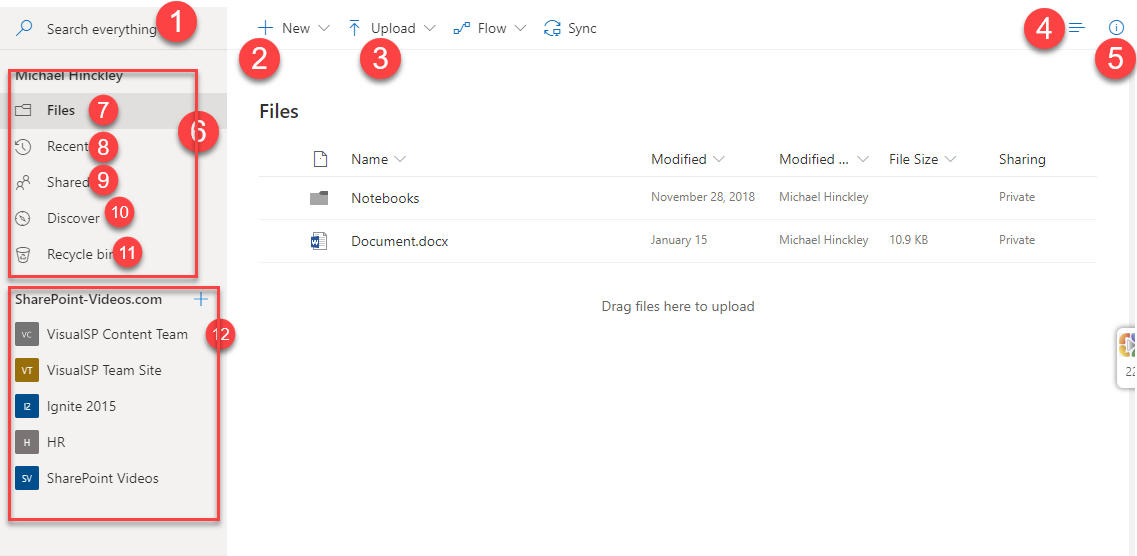
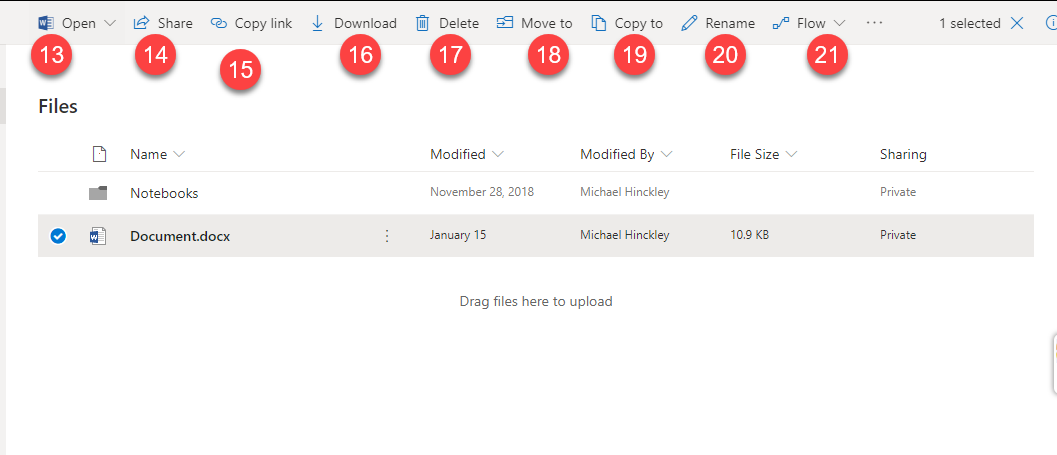
| 1 | Modern OneDrive | Search Box | .od-SearchBox-search .od-SearchBox-input | #inplaceSearchDiv_WPQ1_lsinput |
| 2 | Modern OneDrive | New Button | div.ms-OverflowSet.ms-CommandBar-primaryCommand > div:nth-child(1) > button | |
| 3 | Modern OneDrive | Upload Button | div.ms-OverflowSet.ms-CommandBar-primaryCommand > div:nth-child(2) > button | |
| 4 | Modern OneDrive | Change view | div.ms-OverflowSet.ms-CommandBar-secondaryCommand > div:nth-child(1) > button | |
| 5 | Modern OneDrive | Info | div.ms-OverflowSet.ms-CommandBar-secondaryCommand > div:nth-child(2) > button | |
| 6 | Modern OneDrive | Your Files Section | .LeftNav-linkArea .LeftNav-linkGroupContainer:nth-of-type(1) .LeftNav-subLinksClip | |
| 7 | Modern OneDrive | Files Link | .LeftNav-is-active | |
| 8 | Modern OneDrive | Recent | .LeftNav-subLink:nth-child(2) | |
| 9 | Modern OneDrive | Shared | .LeftNav-subLink:nth-child(3) | |
| 10 | Modern OneDrive | Discover | .LeftNav-subLink:nth-child(4) | |
| 11 | Modern OneDrive | Recycle Bin | .LeftNav-subLink:nth-child(5) | |
| 12 | Modern OneDrive | Groups Section | .LeftNav-linkArea .LeftNav-linkGroupContainer:nth-of-type(2) .LeftNav-subLinksClip | |
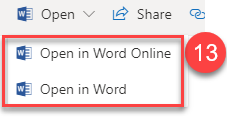
| 13 | Modern OneDrive | Open | div.ms-OverflowSet.ms-CommandBar-primaryCommand > div:nth-child(1) > button | Library Item must be checked to activate |
| 13.1 | Modern OneDrive | Open Menu | .ms-ContextualMenu-list.is-open | Library Item must be checked to activate |
| 14 | Modern OneDrive | Share and Upload to excel | div.ms-OverflowSet.ms-CommandBar-secondaryCommand > div:nth-child(2) > button | Library Item must be checked to activate |
| 15 | Modern OneDrive | Copy link | div.ms-OverflowSet.ms-CommandBar-secondaryCommand > div:nth-child(3) > button | Library Item must be checked to activate |
| 16 | Modern OneDrive | Download | div.ms-OverflowSet.ms-CommandBar-secondaryCommand > div:nth-child(4) > button | Library Item must be checked to activate |
| 17 | Modern OneDrive | Delete | div.ms-OverflowSet.ms-CommandBar-secondaryCommand > div:nth-child(5) > button | Library Item must be checked to activate |
| 18 | Modern OneDrive | Move to | ndiv.ms-OverflowSet.ms-CommandBar-secondaryCommand > div:nth-child(6) > button | Library Item must be checked to activate |
| 19 | Modern OneDrive | Copy to | div.ms-OverflowSet.ms-CommandBar-secondaryCommand > div:nth-child(7) > button | Library Item must be checked to activate |
| 20 | Modern OneDrive | Rename | div.ms-OverflowSet.ms-CommandBar-secondaryCommand > div:nth-child(8) > button | Library Item must be checked to activate |
| 21 | Modern OneDrive | Flow | div.ms-OverflowSet.ms-CommandBar-secondaryCommand > div:nth-child(9) > button | Library Item must be checked to activate |
| 22 | Modern OneDrive | Version | div.ms-OverflowSet.ms-CommandBar-secondaryCommand > div:nth-child(10) > button | Library Item must be checked to activate |
OneDrive 2016
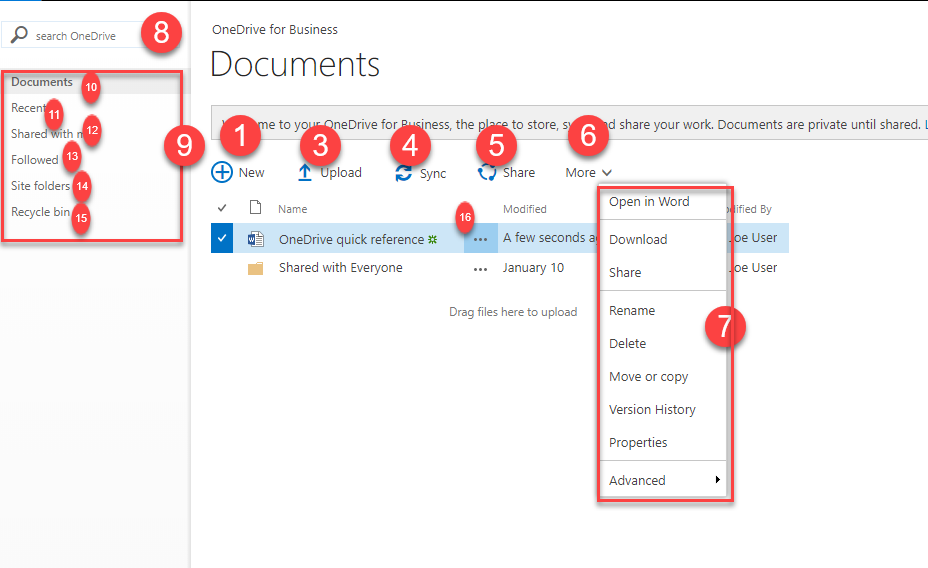
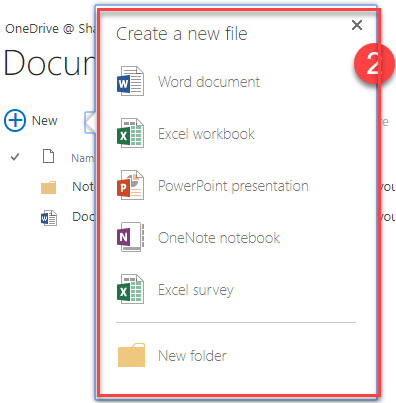
| 1 | 2016 One Drive | New Button | .js-listview-qcbNewButton | |
| 2 | 2016 One Drive | Entire New Pop up window | #cojs-newdocWOPI-WPQ1_callout | Must be visible to be targeted |
| 3 | 2016 One Drive | Upload Button | .js-listview-qcbUploadButton | |
| 4 | 2016 One Drive | Sync Button | .js-listview-qcbSyncButton | |
| 5 | 2016 One Drive | Share Button | .js-listview-qcbShareButton | When file selected |
| 6 | 2016 One Drive | More Button | .js-listview-qcbManageButton | When file selected |
| 7 | 2016 One Drive | More Pop out | .ms-contextmenu-box.ms-js-contextmenu | When file selected |
| 8 | 2016 One Drive | Search | .ms-querybox-input | |
| 9 | 2016 One Drive | My Files Section | #sideNavBox #DeltaPlaceHolderLeftNavBar .ms-core-sideNavBox-removeLeftMargin | |
| 10 | 2016 One Drive | Documents | #sideNavBox #DeltaPlaceHolderLeftNavBar .ms-core-sideNavBox-removeLeftMargin a.ms-core-listMenu-item span.menu-item-text:contains("Documents") | |
| 11 | 2016 One Drive | Recent | #sideNavBox #DeltaPlaceHolderLeftNavBar .ms-core-sideNavBox-removeLeftMargin a.ms-core-listMenu-item span.menu-item-text:contains("Recent") | #zz9_RootAspMenu :nth-child(2) .ms-navedit-linkNode |
| 12 | 2016 One Drive | Shared With Me | #sideNavBox #DeltaPlaceHolderLeftNavBar .ms-core-sideNavBox-removeLeftMargin a.ms-core-listMenu-item span.menu-item-text:contains("Shared with me") | #zz9_RootAspMenu :nth-child(3) .ms-navedit-linkNode |
| 13 | 2016 One Drive | Followed | #sideNavBox #DeltaPlaceHolderLeftNavBar .ms-core-sideNavBox-removeLeftMargin a.ms-core-listMenu-item span.menu-item-text:contains("Followed") | #zz9_RootAspMenu :nth-child(4) .ms-navedit-linkNode |
| 14 | 2016 One Drive | Site Folders | #sideNavBox #DeltaPlaceHolderLeftNavBar .ms-core-sideNavBox-removeLeftMargin a.ms-core-listMenu-item span.menu-item-text:contains("Site Folders") | #zz9_RootAspMenu :nth-child(5) .ms-navedit-linkNode |
| 15 | 2016 One Drive | Recycle Bin | #sideNavBox #DeltaPlaceHolderLeftNavBar .ms-core-sideNavBox-removeLeftMargin a.ms-core-listMenu-item span.menu-item-text:contains("Recycle bin") | #zz9_RootAspMenu :nth-child(6) .ms-navedit-linkNode |
| 16 | 2016 One Drive | 3 dots | tr.s4-itm-selected .ms-list-itemLink-td | When file selected |
2019 Team Site, Modern
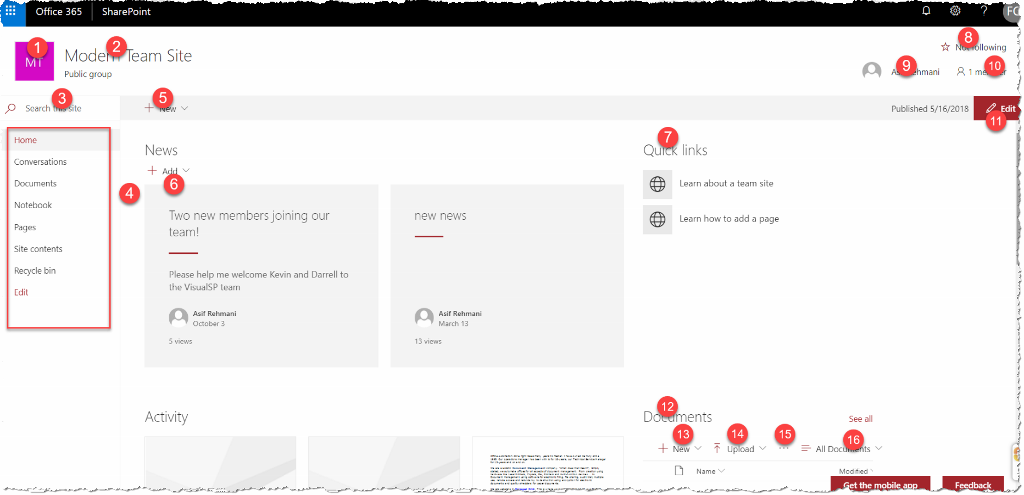
 1) .ms-siteLogo-defaultLogo
2) .ms-siteHeader-siteName
3) .ms-searchux-searchbox
4) .ms-Nav
5) .ms-CommandBarItem-link
6) .ms-Button:contains("Add"):first
7) span:contains("Quick links")
8) .ms-compositeHeader-addnCommands
9) .ms-TooltipHost
10) .ms-membersInfo-membersNumber
11) button[data-automation-id="pageCommandBarEditButton"]
12) .CanvasSection span:contains("Documents")
13) .CanvasSection button[name="New"]
14) .CanvasSection button[name="Upload"]
15) .CanvasSection button i[data-icon-name="More"]
16) .CanvasSection button[name="All Documents"]
A) .ms-Button:contains("Add"):first i[data-icon-name="ChevronDown"]
B) button:contains('<name>'):first (ex: button:contains('News post'):first)
a) .ms-CommandBarItem-link i[data-icon-name="ChevronDown"]
b) button:contains('<name>'):first (ex: button:contains('List'):first)
1) .ms-siteLogo-defaultLogo
2) .ms-siteHeader-siteName
3) .ms-searchux-searchbox
4) .ms-Nav
5) .ms-CommandBarItem-link
6) .ms-Button:contains("Add"):first
7) span:contains("Quick links")
8) .ms-compositeHeader-addnCommands
9) .ms-TooltipHost
10) .ms-membersInfo-membersNumber
11) button[data-automation-id="pageCommandBarEditButton"]
12) .CanvasSection span:contains("Documents")
13) .CanvasSection button[name="New"]
14) .CanvasSection button[name="Upload"]
15) .CanvasSection button i[data-icon-name="More"]
16) .CanvasSection button[name="All Documents"]
A) .ms-Button:contains("Add"):first i[data-icon-name="ChevronDown"]
B) button:contains('<name>'):first (ex: button:contains('News post'):first)
a) .ms-CommandBarItem-link i[data-icon-name="ChevronDown"]
b) button:contains('<name>'):first (ex: button:contains('List'):first)
2019 Modern List

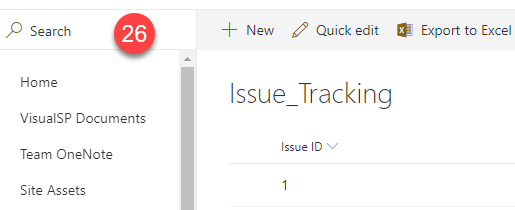
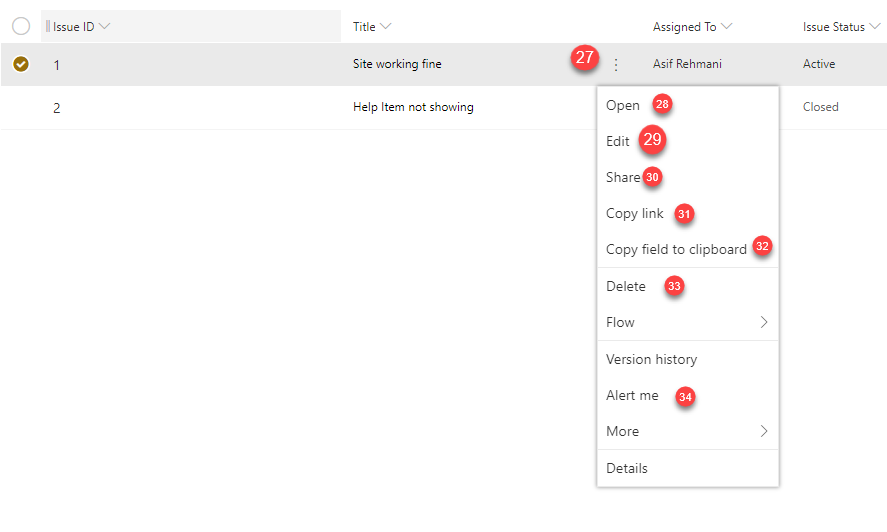
| 1 | .CommandBar-mainArea .CommandBarItem:nth-child(1) .CommandBarItem-link |
| 2 | .CommandBar-mainArea .CommandBarItem:nth-child(3) .CommandBarItem-link |
| 3 | .CommandBar-mainArea .CommandBarItem:nth-child(4) .CommandBarItem-link |
| 4 | .ms-ContextualMenu-item button[name="Alert me"] |
| 5 | div.CommandBar-sideArea > div.CommandBarItem:nth-child(1) |
| 6 | div.CommandBar-sideArea > div.CommandBarItem:nth-child(2) |
| 7 | div.CommandBar-sideArea > div.CommandBarItem:nth-child(3) |
| 8 | .ms-Check.is-checked |
| 9 | .CommandBar-mainArea .CommandBarItem:nth-child(1) .CommandBarItem-link |
| 10 | .CommandBar-mainArea .CommandBarItem:nth-child(2) .CommandBarItem-link |
| 11 | .CommandBar-mainArea .CommandBarItem:nth-child(3) .CommandBarItem-link |
| 12 | .CommandBar-mainArea .CommandBarItem:nth-child(4) .CommandBarItem-link |
| 13 | div.CommandBar-sideArea > div.CommandBarItem.is-toggled:nth-child(2) |
| 14 | div.Files-rightPane > div.Files-rightPaneContent > div > div > div > div:nth-child(2) > .FiltersPane-sectionContent .ms-Checkbox > label > div |
| 15 | div.Files-rightPane > div.Files-rightPaneContent > div > div > div > div:nth-child(3) > .FiltersPane-sectionContent .ms-Checkbox > label > div |
| 16 | div.Files-rightPane > div.Files-rightPaneContent > div > div > div > div:nth-child(4) > .FiltersPane-sectionContent .ms-Checkbox > label > div |
| 17 | div.Files-rightPane > div.Files-rightPaneContent > div > div > div > div:nth-child(5) > .FiltersPane-slider |
| 18 | div.Files-rightPaneContent > div > div > div > div.FiltersPane-section.FiltersPane-sliderFilterSection > div.FiltersPane-section > div.FiltersPane-sectionFooter > a |
| 19 | div.ms-ScrollablePane--contentContainer > div.od-DetailsPane-PrimaryPane-wrapper > div > div.od-DetailsPane-PrimaryPane-body > div > div > div:nth-child(1) > div > div > div.ms-font-s > a |
| 20 | div.od-DetailsPane-PrimaryPane-wrapper > div > div.od-DetailsPane-PrimaryPane-body > div > div > div:nth-child(2) > div > div > div.InfoPane-sectionContent > div > div > div > div > div:nth-child(1) > div.ReactFieldEditor-core--display.is-infoPane > div > span |
| 21 | div.od-DetailsPane-PrimaryPane-wrapper > div > div.od-DetailsPane-PrimaryPane-body > div > div > div:nth-child(2) > div > div > div.InfoPane-sectionContent > div > div > div > div > div:nth-child(2) > div.ReactFieldEditor-core--display.is-infoPane > div > |
| 22 | div.od-DetailsPane-PrimaryPane-wrapper > div > div.od-DetailsPane-PrimaryPane-body > div > div > div:nth-child(2) > div > div > div.InfoPane-sectionContent > div > div > div > div > div:nth-child(3) > div.ReactFieldEditor-core--display.is-infoPane > div > |
| 23 | div.od-DetailsPane-PrimaryPane-wrapper > div > div.od-DetailsPane-PrimaryPane-body > div > div > div:nth-child(2) > div > div > div.InfoPane-sectionContent > div > div > div > div > div:nth-child(4) > div.ReactFieldEditor-core--display.is-infoPane > div > |
| 24 | div.od-DetailsPane-PrimaryPane-wrapper > div > div.od-DetailsPane-PrimaryPane-body > div > div > div:nth-child(2) > div > div > div.InfoPane-sectionContent > div > div > div > div > div:nth-child(5) > div.ReactFieldEditor-core--display.is-infoPane > div > |
| 25 | div.od-DetailsPane-PrimaryPane-wrapper > div > div.od-DetailsPane-PrimaryPane-body > div > div > div:nth-child(2) > div > div > div.InfoPane-sectionContent > div > div > div > div > div:nth-child(6) > div.ReactFieldEditor-core--display.is-infoPane > div > |
| 26 | .od-SearchBox-input |
| 27 | .ms-DetailsRow.is-selected .od-FieldRenderer-dot |
| 28 | .ms-ContextualMenu-Callout .ms-Callout-main ul li.ms-ContextualMenu-item:nth-child(1) |
| 29 | .ms-ContextualMenu-Callout .ms-Callout-main ul li.ms-ContextualMenu-item:nth-child(2) |
| 30 | .ms-ContextualMenu-Callout .ms-Callout-main ul li.ms-ContextualMenu-item:nth-child(3) |
| 31 | .ms-ContextualMenu-Callout .ms-Callout-main ul li.ms-ContextualMenu-item:nth-child(4) |
| 32 | .ms-ContextualMenu-Callout .ms-Callout-main ul li.ms-ContextualMenu-item:nth-child(5) |
| 33 | .ms-ContextualMenu-Callout .ms-Callout-main ul li.ms-ContextualMenu-item:nth-child(7) |
| 34 | .ms-ContextualMenu-Callout .ms-Callout-main ul li.ms-ContextualMenu-item:nth-child(9) |
2019 Document Library, Modern
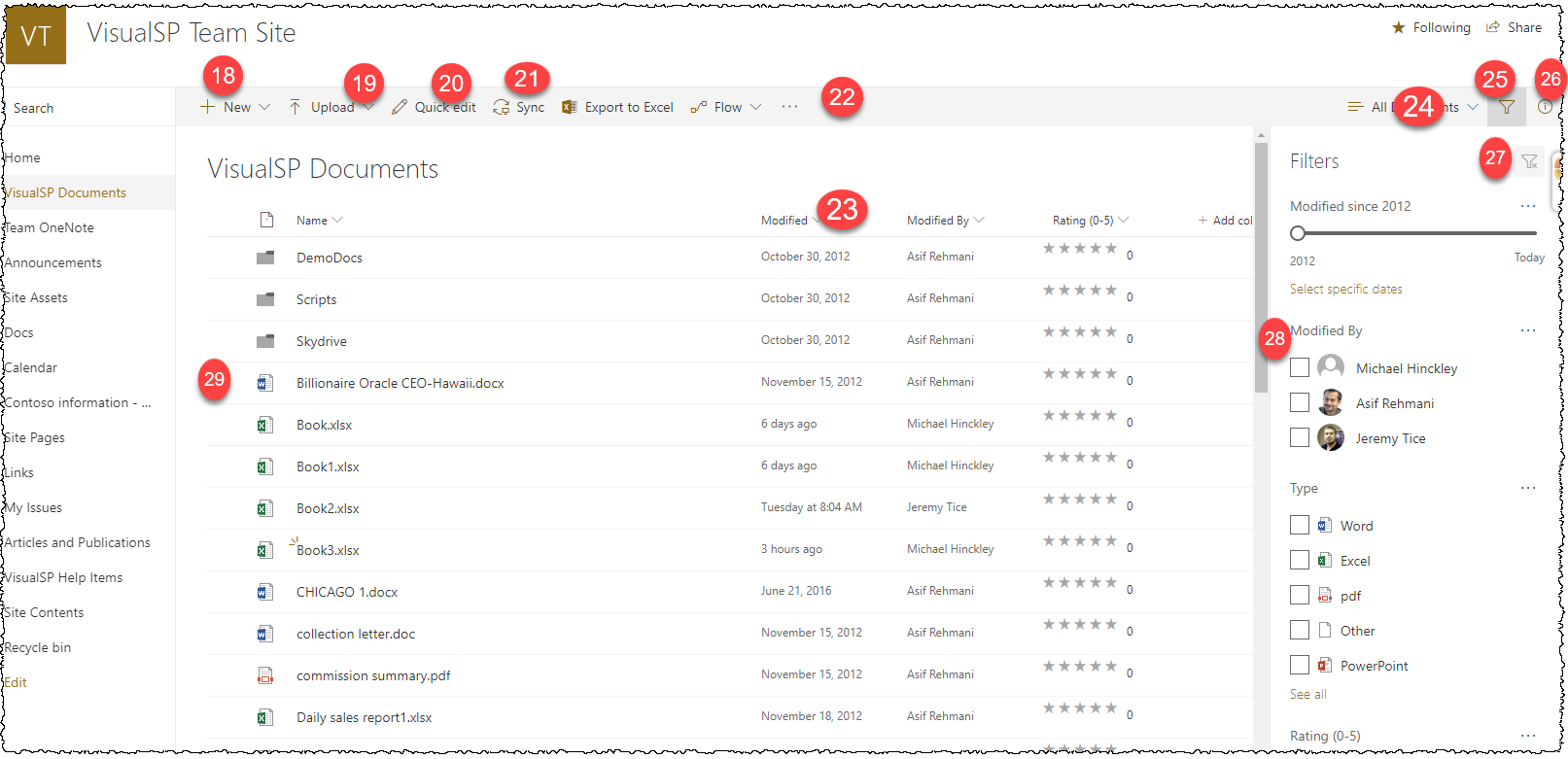
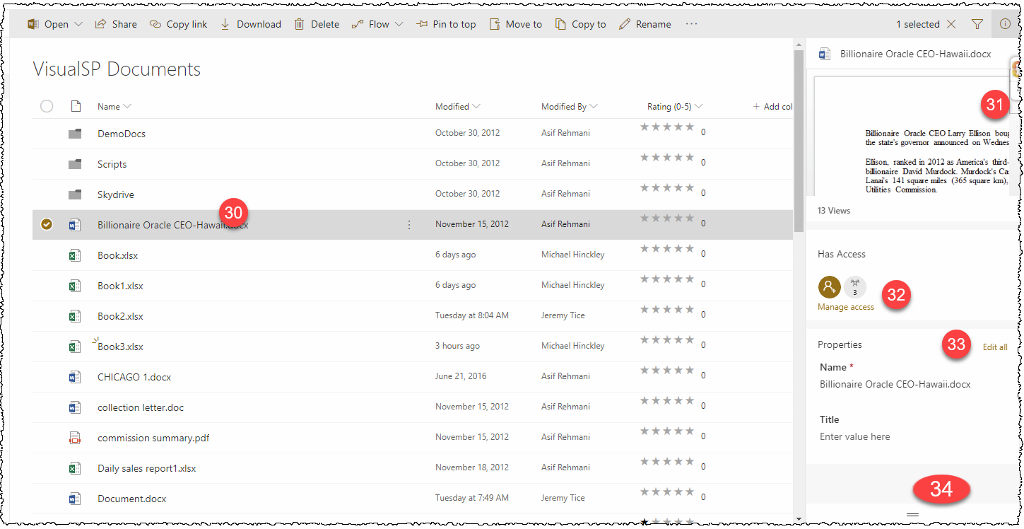
 |
 |
 |
| 18 | Modern Doc Lib | New Button | div.CommandBar-mainArea > div.CommandBarItem:nth-child(1) | |
| 19 | Modern Doc Lib | Upload Button | div.CommandBar-mainArea > div.CommandBarItem:nth-child(2) | |
| 20 | Modern Doc Lib | Quick Edit | Not in SP 2019????? | |
| 21 | Modern Doc Lib | Share and Upload to excel | div.CommandBar-mainArea > div.CommandBarItem:nth-child(3) | |
| 22 | Modern Doc Lib | 3 dots | div.CommandBar-mainArea > div.CommandBarItem:nth-child(5) | |
| 23 | Modern Doc Lib | Drop Down Arrow on Columns | .ms-DetailsList .ms-DetailsHeader .ms-DetailsHeader-cell .ms-DetailsHeader-filterChevron:eq(2) | |
| 24 | Modern Doc Lib | View Choice | div.CommandBar-sideArea > div.CommandBarItem:nth-child(1) | |
| 25 | Modern Doc Lib | Filter | div.CommandBar-sideArea > div.CommandBarItem:nth-child(2) | |
| 26 | Modern Doc Lib | Info | div.CommandBar-sideArea > div.CommandBarItem:nth-child(3) | |
| 27 | Modern Doc Lib | Filter pop out | div.FiltersPane .FiltersPane-filterClear-icon | |
| 28 | Modern Doc Lib | Select File check | Div.FiltersPane | |
| 29 | Modern Doc Lib | Click to open file | .ms-Check.is-checked | |
| 30 | Modern Doc Lib | .ms-DetailsRow.is-selected | ||
| 31 | Modern Doc Lib | Info pop up scroll | .InfoPane | |
| 32 | Modern Doc Lib | Manage access | div.od-DetailsPane-PrimaryPane-wrapper > div > div.od-DetailsPane-PrimaryPane-body > div > div > div:nth-child(2) > div > div | |
| 33 | Modern Doc Lib | Edit all | #spo-Properties-sectionHeader > a | |
| 34 | Modern Doc Lib | More Button | div.Files-rightPane > div.Files-rightPaneContent > div > div > div > div > div > div > div > div:nth-child(2) | |
| 35 | Modern Doc Lib | New pop up window entire | .ms-ContextualMenu.is-open | Dynamically added to page. Must be visible by previous step |
| 36 | Modern Doc Lib | Upload pop up window entire | .ms-ContextualMenu.is-open | Dynamically added to page. Must be visible by previous step |
| 37 | Modern Doc Lib | 3 dots alert | .ms-ContextualMenu.is-open | Dynamically added to page. Must be visible by previous step |
| 38 | Modern Doc Lib | on select file 3 dots | .ms-DetailsRow.is-selected .od-FieldRenderer-dot | Dynamically added to page. Must be visible by previous step |
| 39 | Modern Doc Lib | Open in pop up | .ms-ContextualMenu-itemText:contains("Open"):first | Dynamically added to page. Must be visible by previous step |
| 40 | Modern Doc Lib | word type | .ms-ContextualMenu-itemText:contains("Open in Word"):not(:first) | Dynamically added to page. Must be visible by previous step |

| 41 | Modern Doc Lib | entire window | .ms-ContextualMenu.is-open | Dynamically added to page. Must be visible by previous step |
| 42 | Modern Doc Lib | Open Button | .CommandBar-mainArea .CommandBarItem:nth-child(1) .CommandBarItem-link | Library Item must be checked to activate |
| 43 | Modern Doc Lib | Share Button | .CommandBar-mainArea .CommandBarItem:nth-child(2) .CommandBarItem-link | Library Item must be checked to activate |
| 44 | Modern Doc Lib | Copy Link | .CommandBar-mainArea .CommandBarItem:nth-child(3) .CommandBarItem-link | Library Item must be checked to activate |
| 45 | Modern Doc Lib | Download | .CommandBar-mainArea .CommandBarItem:nth-child(4) .CommandBarItem-link | Library Item must be checked to activate |
| 46 | Modern Doc Lib | Delete | .CommandBar-mainArea .CommandBarItem:nth-child(5) .CommandBarItem-link | Library Item must be checked to activate |
| 47 | Modern Doc Lib | Pin To Top | .CommandBar-mainArea .CommandBarItem:nth-child(6) .CommandBarItem-link | Library Item must be checked to activate |
| 48 | Modern Doc Lib | Move To | .CommandBar-mainArea .CommandBarItem:nth-child(7) .CommandBarItem-link | Library Item must be checked to activate |
| 49 | Modern Doc Lib | Copy To | .CommandBar-mainArea .CommandBarItem:nth-child(8) .CommandBarItem-link | Library Item must be checked to activate |
| 50 | Modern Doc Lib | Rename | .CommandBar-mainArea .CommandBarItem:nth-child(9) .CommandBarItem-link | Library Item must bechecked to activate |
| 51 | Modern Doc Lib | Alert Me click | .ms-ContextualMenu-item button[name="Alert me"] |
O365 Calendar
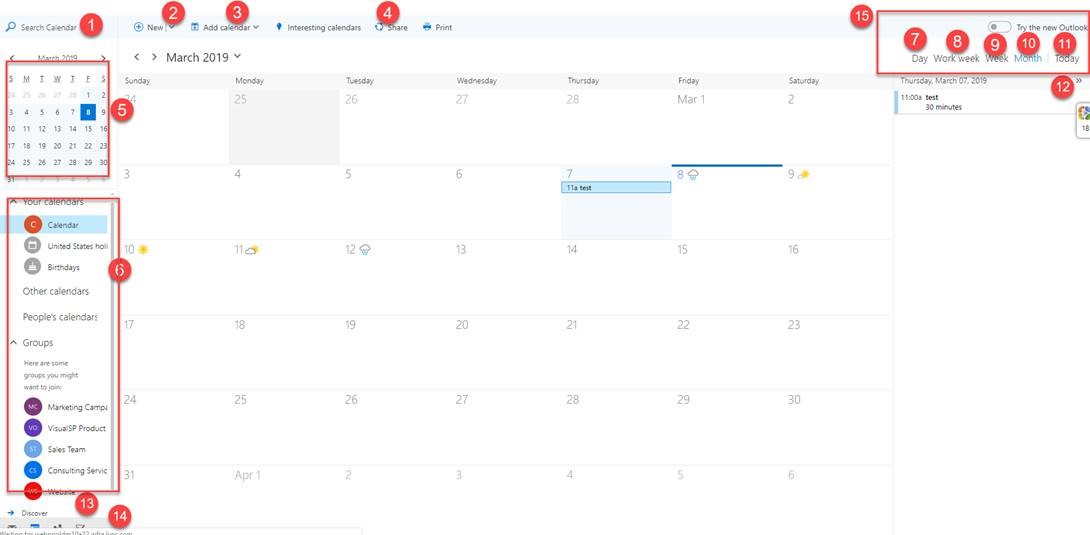
| 1 | Search box | div[role="region"]:first input:first |
| 2 | New Button | ._wx_s .o365button:eq(0) |
| 2a | Drop down box from new | .contextMenuPopup |
| 3 | Add Calendar button | ._wx_s .o365button:eq(2) |
| 3a | Drop down box from add | .contextMenuPopup |
| 4 | Share button | ._wx_s .o365button:eq(4) |
| 5 | Calendar view area | div[role="region"].absoluteposition |
| 6 | Calendars area | .absoluteBottom:eq(1) |
| 7 | Day | div[role="menuitemradio"]:eq(0) |
| 8 | Work Week | div[role="menuitemradio"]:eq(1) |
| 9 | week | div[role="menuitemradio"]:eq(2) |
| 10 | month | div[role="menuitemradio"]:eq(3) |
| 11 | today | div[role="button"]:contains("Today") |
| 12 | Expand | button.o365button > span.ms-Icon--chevronsRight |
| 13 | Discover | |
| 14 | Create | |
| 15 | Area for 7 to 11 | div.[role="region"][aria-label="Calendar header"]:eq(1) |
| 16 | Forward/back | button.o365button[aria-label^="PreviousMonth"] button.o365button[aria-label^="NextMonth"] |
| 17 | Dropbown button | button.o365button[aria-label^="Open Month"] |
| 18 | dropdpwn area | div.peekPopup |
O365 Teams
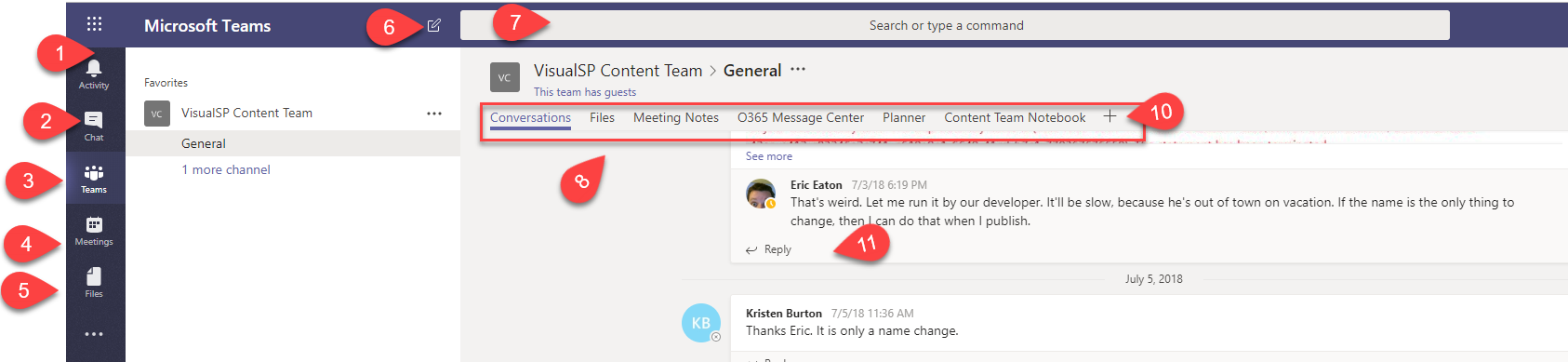
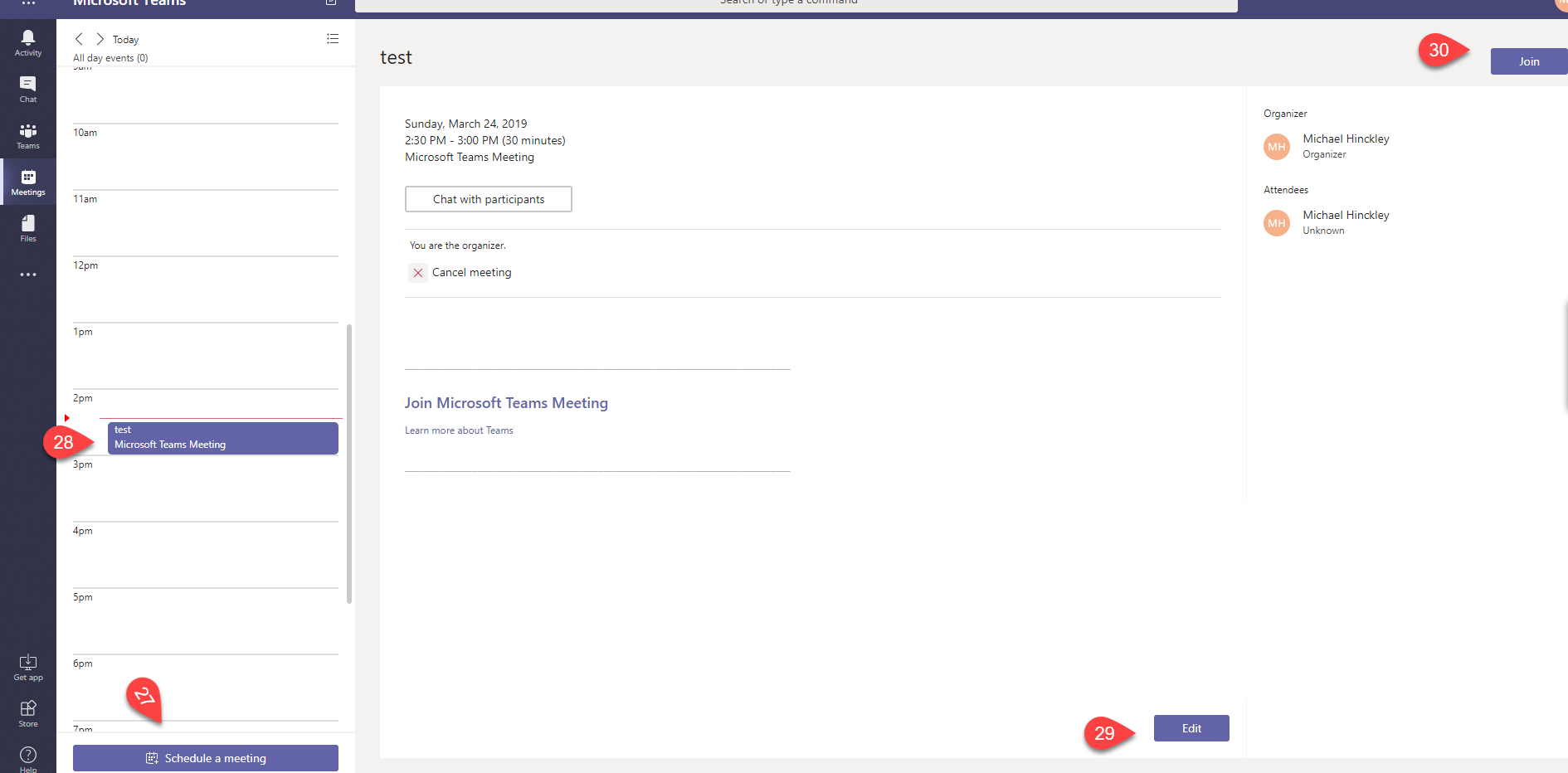
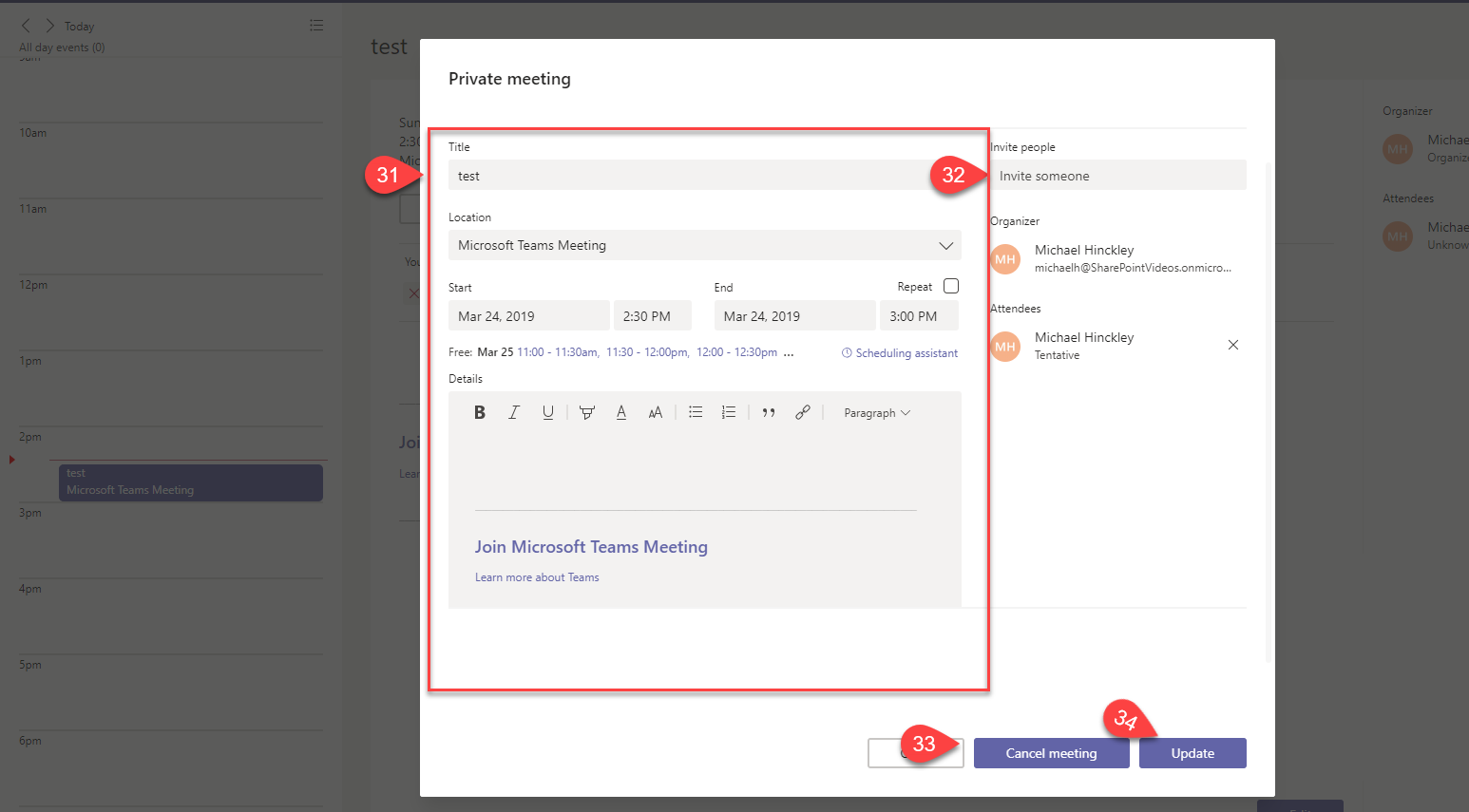
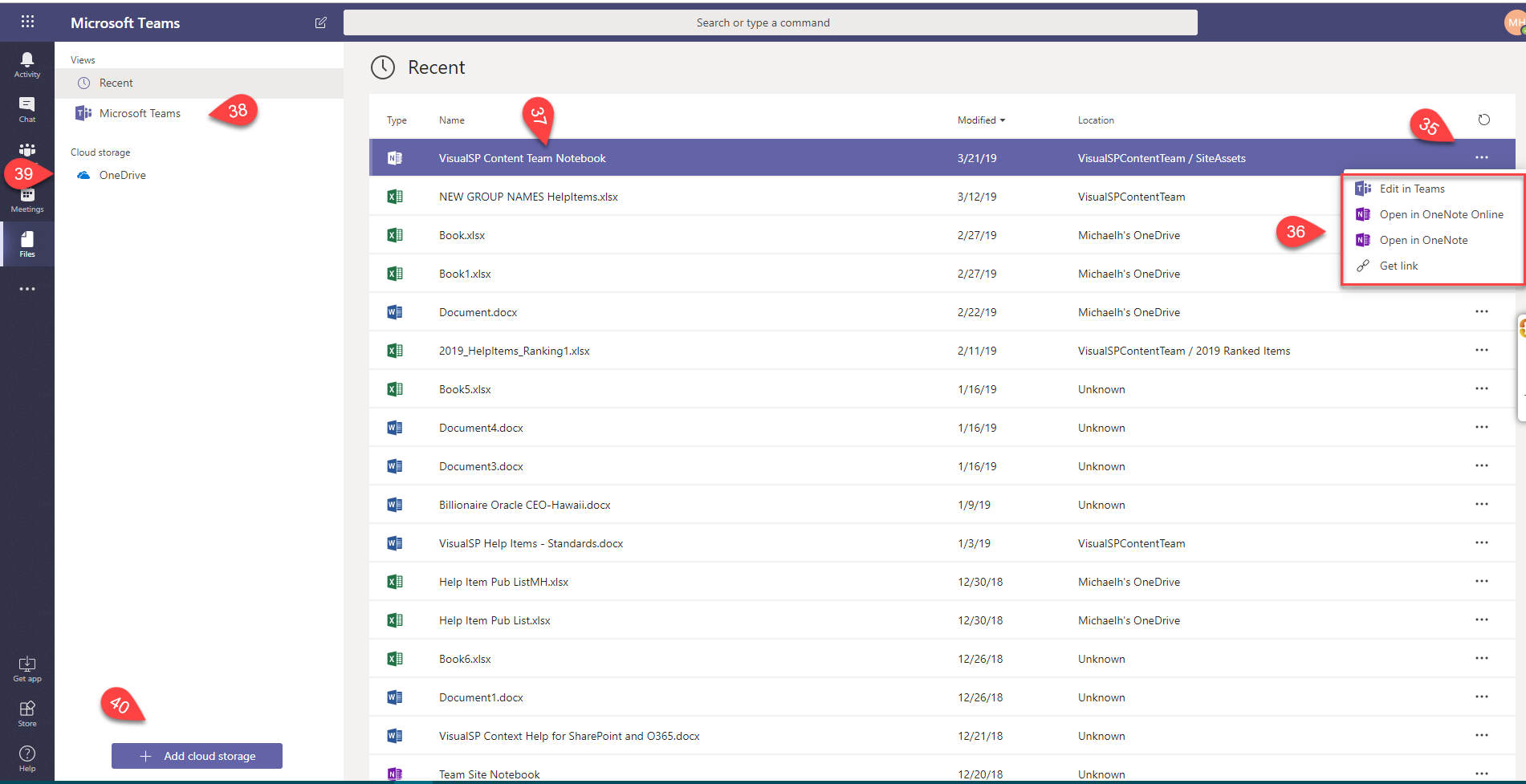
| 1 | Activity | .app-left-wrapper nav#teams-app-bar li.Alerts |
| 2 | Chat | .app-left-wrapper nav#teams-app-bar li.Chat |
| 3 | Teams | .app-left-wrapper nav#teams-app-bar li.Teams |
| 4 | Meetings | .app-left-wrapper nav#teams-app-bar li.Calendar |
| 5 | Files | .app-left-wrapper nav#teams-app-bar li.Files |
| 6 | New chat | .app-header-bar #newchat-button |
| 7 | Search box | .app-header-bar input.ts-header-search |
| 8 | nav bar | .ts-tab-bar-wrapper .app-tabs |
| 9 | ||
| 10 | plus sign | .ts-tab-bar-wrapper .ts-add-tab-button-wrapper |
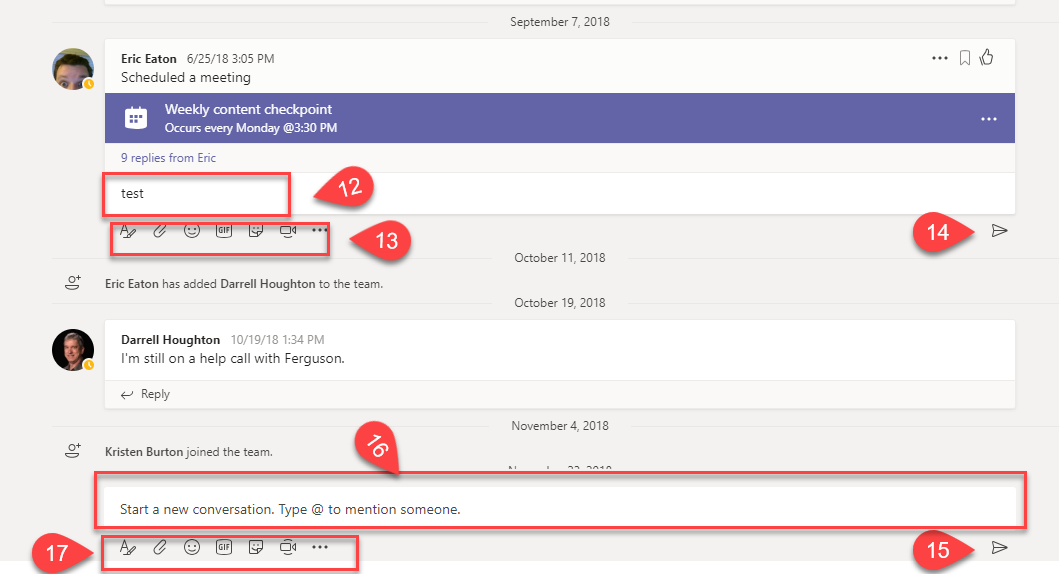
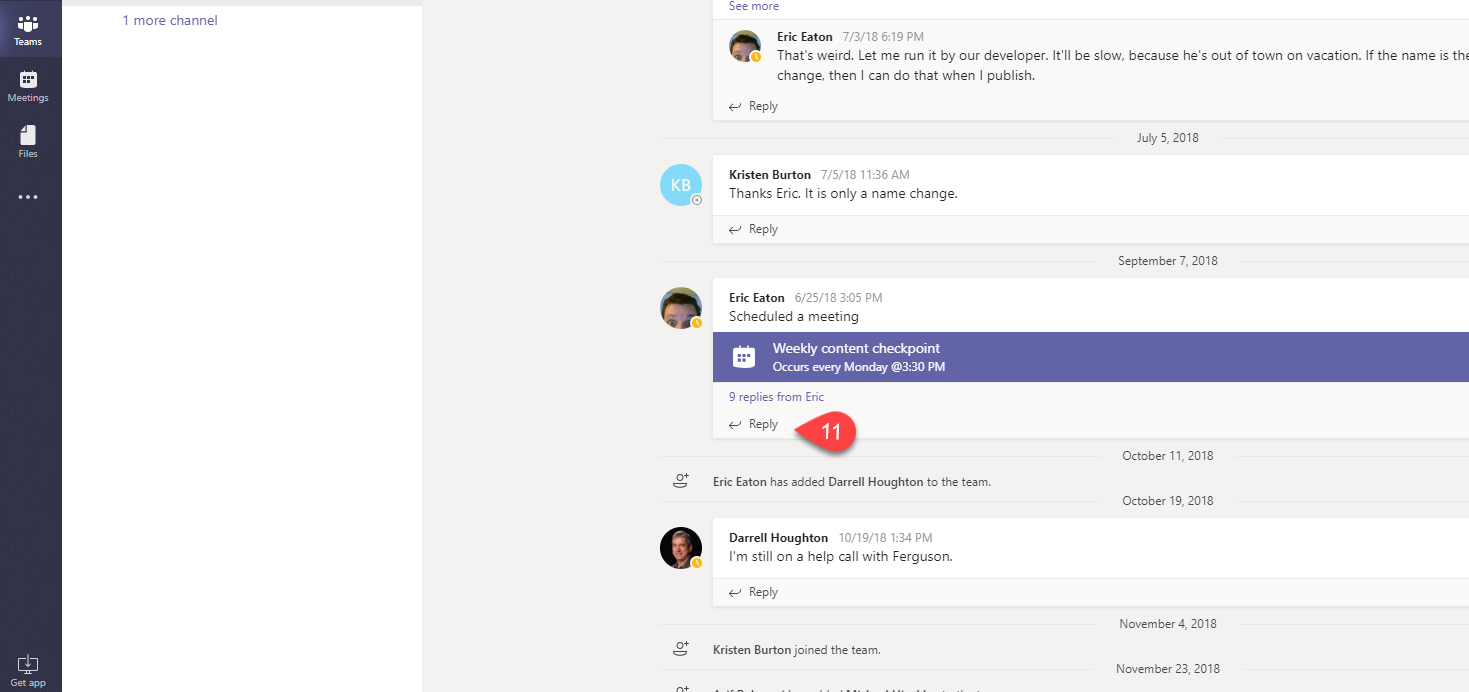
| 11 | Reply | .ts-message-action-toolbar button.icons-reply span |
| 12 | text box | .ts-message-list-item .ts-message.reply-is-visible .ts-reply-form .ts-edit-box |
| 13 | options area | .ts-message-list-item .ts-message.reply-is-visible .extension-icons-container |
| 14 | send | .ts-message-list-item .ts-message.reply-is-visible #send-message-button |
| 15 | send | .ts-add-message #send-message-button |
| 16 | test box | .ts-add-message .ts-edit-box |
| 17 | options area | .ts-add-message .extension-icons-container |
| 18 | contact | .ts-chats-header li.recipient-group-list-item:eq(0) |
| 19 | 3 dots | svg.icons-filled |
| 20 | drop dpwn | .popover[id^="chat-actions"] |
| 21 | video | .start-call-buttons-wrapper button:eq(0) |
| 22 | call | .start-call-buttons-wrapper button:eq(1) |
| 23 | add person | button.icons-team-create |
| 24 | nav section | .app-messages-header .app-tabs.v2-chat-tabs |
| 25 | text box | .ts-add-message .ts-edit-box |
| 26 | options area | .ts-add-message .extension-icons-container |
| 27 | schedule meeting | button[data-tid="calendar-new-meeting"] |
| 28 | select existing | a.fc-event |
| 29 | Edit | .ts-footer-container .ts-btn |
| 30 | join | .header .joinmeeting |
| 31 | details section | .ts-modal-dialog-content .create-update-meeting-container |
| 32 | invite box | .ts-modal-dialog-content .ts-amd-al .control-input |
| 33 | cancel meeting | .ts-modal-dialog-footer-buttons button:eq(1) |
| 34 | update | .ts-modal-dialog-footer-buttons button:eq(2) |
| 35 | 3 dots | .ts-files-table-container div.tr.st-selected div.td.ts-file-action-column div.file-menu |
| 36 | drop down | .popover .app-default-menu-ul |
| 37 | selected file | .ts-files-table-container div.tr.st-selected div.ts-ent-title |
| 38 | teams option | .files-navigation-item[aria-label="Microsoft Teams"] .icons-recents |
| 39 | onedrive | .section-list.uses-global-shortcuts:eq(1) |
| 40 | Add cloud storage | files-navigation button:contains("Add cloud storage") |
O365 Outlook
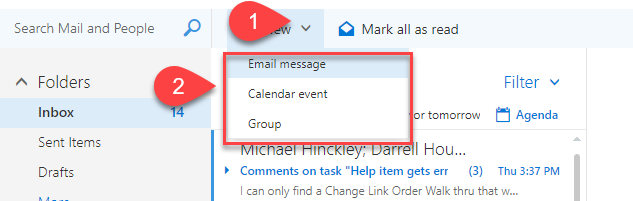
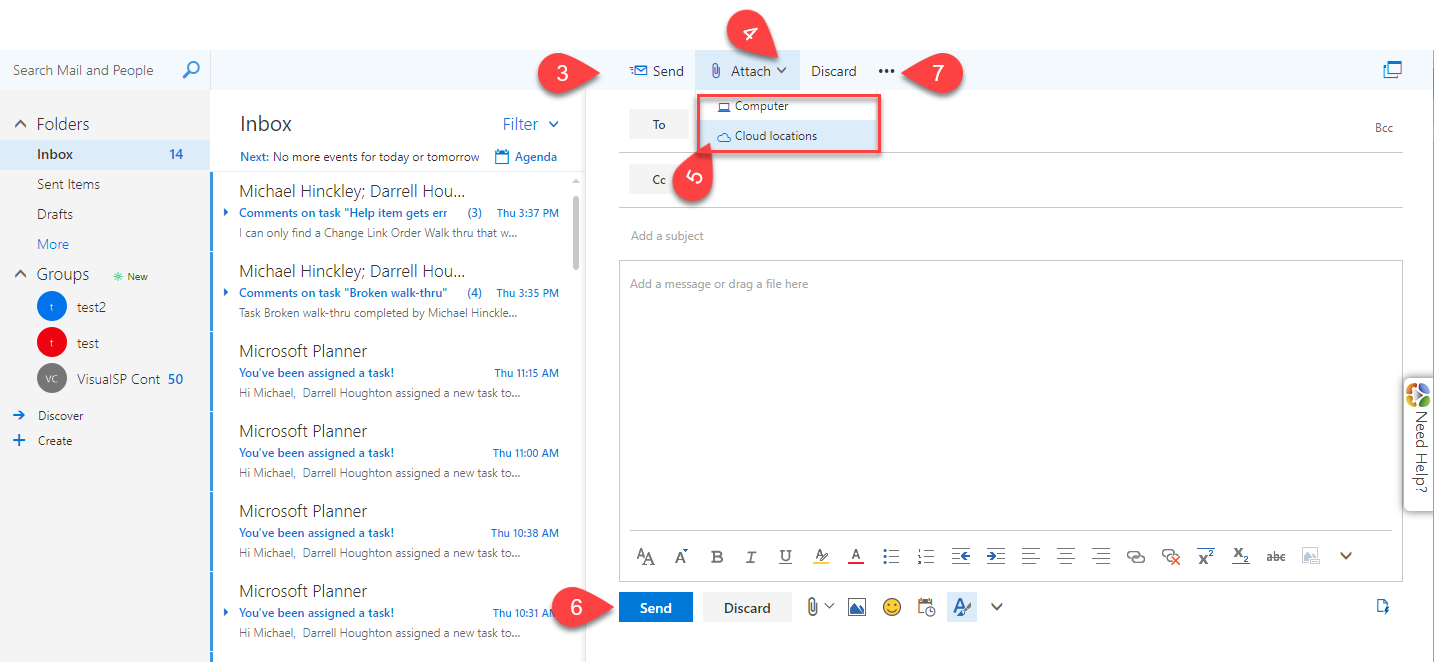
 1) div[role="toolbar"] .o365button.commandAdjustPosition
2) .contextMenuPopup
3) div[role="toolbar"] .o365button[aria-label="Send"]
4) div[role="toolbar"] .o365button[title="Attach"]
5) .contextMenuPopup
6) .o365button[aria-label="Send"]:eq(1)
7) div[role="toolbar"] .o365button[title="More actions"]
8) .contextMenuPopup
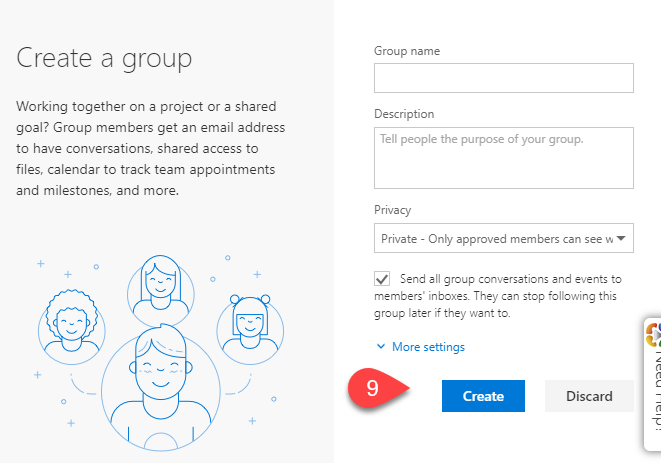
9) .popupPanel .o365button[title="Create"]
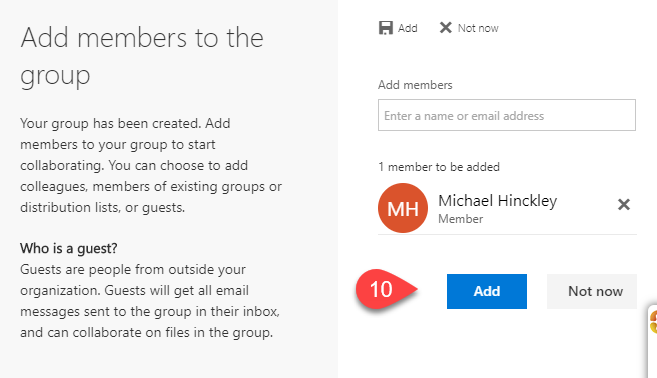
10) .popupPanel .o365button[title="Add"]:eq(1)
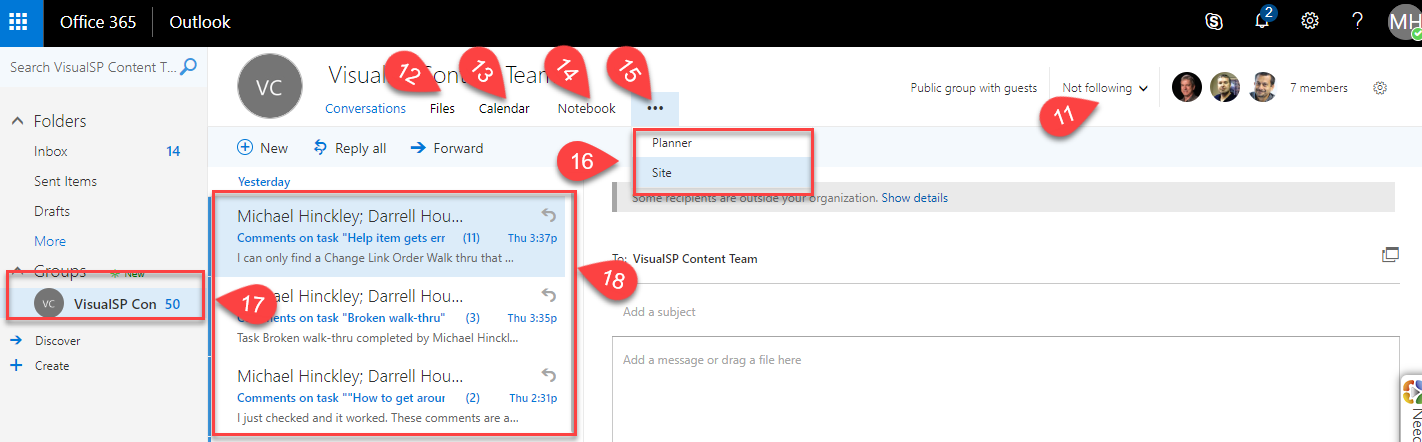
11) div[role="heading"] .o365button[aria-label="Not following"]
12) div[role="heading"] .o365button[aria-label="Files"]
13) div[role="heading"] .o365button[aria-label="Calendar"]
14) div[role="heading"] .o365button[aria-label="Go to the group notebook"]
15) div[role="heading"] .o365button[aria-label="More"]
16) .contextMenuPopup
17) div[aria-label="Joined groups "] div[role="tree"] div[role="treeitem"]:eq(0)
18) .ms-bg-color-white.scrollContainer
1) div[role="toolbar"] .o365button.commandAdjustPosition
2) .contextMenuPopup
3) div[role="toolbar"] .o365button[aria-label="Send"]
4) div[role="toolbar"] .o365button[title="Attach"]
5) .contextMenuPopup
6) .o365button[aria-label="Send"]:eq(1)
7) div[role="toolbar"] .o365button[title="More actions"]
8) .contextMenuPopup
9) .popupPanel .o365button[title="Create"]
10) .popupPanel .o365button[title="Add"]:eq(1)
11) div[role="heading"] .o365button[aria-label="Not following"]
12) div[role="heading"] .o365button[aria-label="Files"]
13) div[role="heading"] .o365button[aria-label="Calendar"]
14) div[role="heading"] .o365button[aria-label="Go to the group notebook"]
15) div[role="heading"] .o365button[aria-label="More"]
16) .contextMenuPopup
17) div[aria-label="Joined groups "] div[role="tree"] div[role="treeitem"]:eq(0)
18) .ms-bg-color-white.scrollContainer